 RockCloud-基石云安全-官方博客
When a domain is blocked in WeChat and won't open, the first thing is not to look for an unblocking channel—it's to confirm which layer the block occurs at. Doing it in the wrong order can waste three days on ineffective appeals.
The complete process is: confirm block scope → determine soft vs. hard block → complete remediation self-check → submit in-app webmaster appeal → supplement with other official channels → maintain access via UA guidance during the appeal. Below, we walk through each step and clarify what's needed to pass.
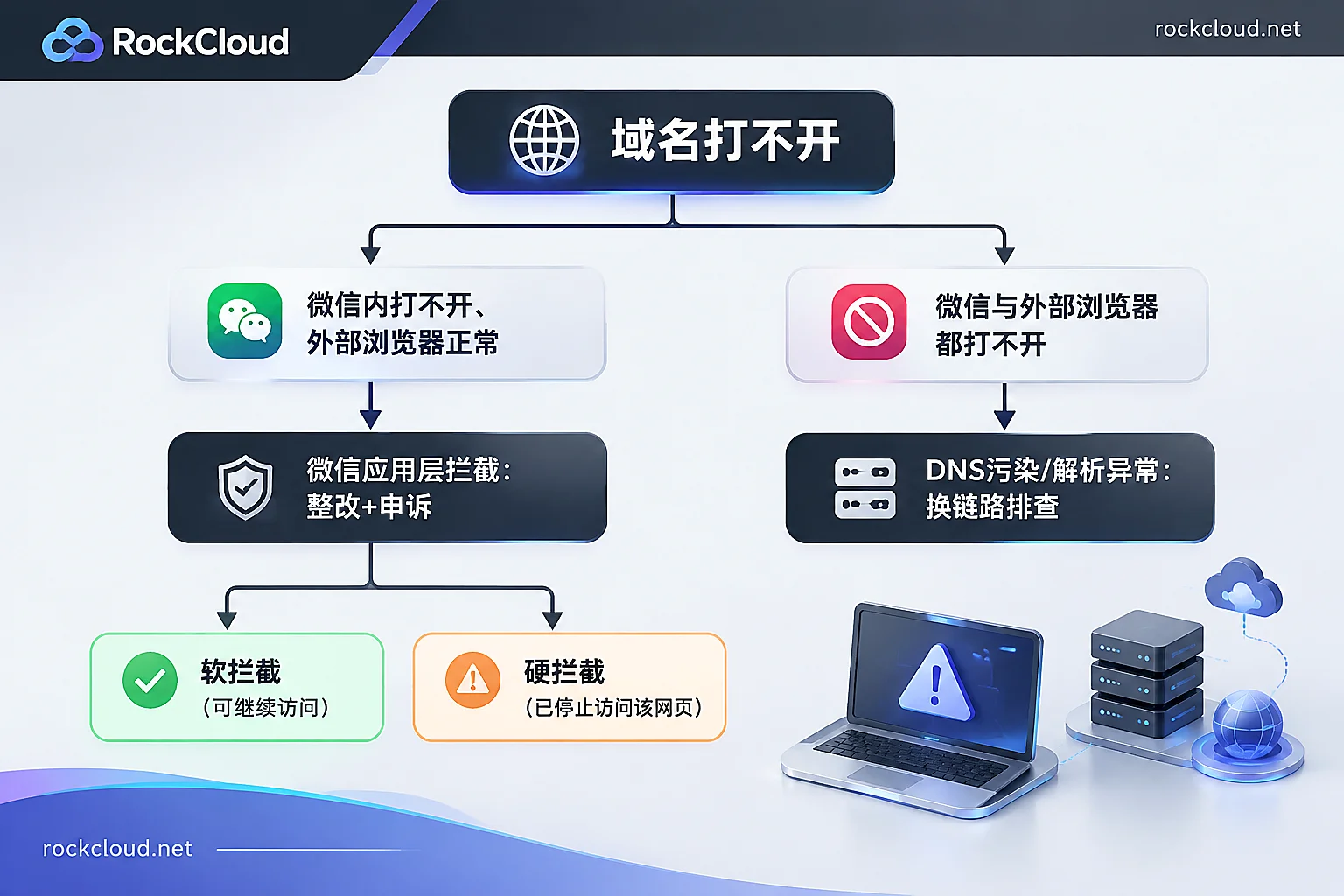
Step 1: First distinguish WeChat block from DNS poisoning
Do a cross-test with three devices—you'll get a clear picture in five minutes:
- WeChat built-in browser fails, but mobile Safari/Chrome and desktop open normally → application-layer block within WeChat ecosystem, enforced by Tencent's security system, affects only WeChat (including QQ built-in browser). Follow the appeal process later in this article.
- WeChat fails, and external browsers also fail, or resolve to strange IPs, or connection reset → This is not a WeChat issue; more likely DNS poisoning or regulatory blocking at the ISP backbone level. Remediation is completely different. Refer to How to Recover a Domain Blocked by DNS Poisoning: Confirm Layers First, Then Decide Between Scrubbing or Reverse Proxy.
- Both fail, and origin load is abnormal, bandwidth maxed → First treat as an availability issue, don't rush to appeal.
This step is essential. WeChat blocks and DNS poisoning both sound like "can't open" to users, but one requires a remediation statement, the other requires changing DNS and access routes. Mixing them up leads to failure on both fronts.
Step 2: See if it's a soft or hard block
The urgency differs greatly:
- Soft block: Yellow security risk warning page, users can tap "continue" to access. Business isn't completely interrupted, but conversions drop significantly. It's a warning sign that the domain is on a risk list.
- Hard block: Red exclamation mark, "Access to this webpage has been stopped," no entry point, link dead. All shared links become invalid simultaneously.
Hard block means the domain is on Tencent's URL security blacklist and requires a full appeal. Timely remediation during a soft block often prevents escalation to hard block. Also verify the block granularity: is the entire primary domain flagged, or only specific URLs? If only individual pages, prioritize those; the main domain might still work.
Step 3: Complete remediation before appealing
Appeals aren't a mere formality—reviewers will recrawl the pages. Submitting before remediation is done wastes an opportunity, and repeated rejections prolong the process. Common triggers for blocks fall into a few categories; go through them item by item:
Content and interaction
- Remove all inducement to share or follow: "Share to 3 groups to unlock," "Long-press to follow and claim," "Forward to withdraw cash," including pop-ups, overlays, and campaign pages.
- Check for illegal marketing, exaggerated claims, lottery rebates, or suspected fraud.
- For UGC sites, focus on user-generated content and external links—what others post on your domain still counts against you.
Security
- Check if the site is hacked, has hidden links, or malicious redirects. Many blocks are triggered after a hack; the webmaster sees everything normal on desktop, but mobile or search engine UA visits redirect to gambling sites. Test with different UAs on homepage and several inner pages.
- Inspect third-party ads, analytics, and customer service scripts—compromised external JS can drag down the main domain.
- If compromised, clean backdoors, change passwords, patch vulnerabilities before appealing; otherwise it'll be re-flagged soon after unblocking.
Compliance and certificates
- HTTPS certificate must be valid and trusted—not expired, not self-signed, no mixed content errors.
- For domestic servers, confirm ICP filing is active, not cancelled or transferred to another entity.
- For overseas servers without filing, certificate and content compliance must be even cleaner since the filing proof is missing.
Take screenshots before and after remediation, keep records of timestamps and changes for the appeal.
Step 4: Use in-app "Apply for restoration" via webmaster verification
This is the official preferred path and has the highest success rate:
- Open the blocked link in WeChat, tap "Apply for restoration" on the block page.
- Pass the initial quiz, truthfully fill in page purpose and remediation details.
- Identity selection is critical—choose "Webmaster verification," not regular user feedback. Non-webmaster submissions have extremely low success rates, almost like a dead end.
- The system provides a specified verification text file; download and place it in the site root.
- After ownership verification, submit remediation statement with before/after screenshots, business license or filing info, etc.
Verification file step is most error-prone, especially for sites behind CDN or WAF: file must be directly accessible in plain text, return 200 not 301/302 redirect to homepage; not blocked by WAF as suspicious; not served as old cached 404 by CDN; if HTTPS forced, ensure both HTTP and HTTPS can fetch it. After placing, test yourself in incognito and from external network.
Step 5: Supplement with other official channels in parallel
If in-app appeal yields no result, or you need multi-channel push:
- Tencent URL Security Center: urlsec.qq.com/complain.html, submit domain appeal with site info and remediation statement.
- Official email: send to [email protected], subject in standard format—【Link Unblock Feedback】Reporter or company name + page topic; body list full blocked links, site nature, when block appeared, what remediation done, attach necessary proof.
Channels can run in parallel, but don't repeatedly submit same content within a day, and don't switch channels hoping for luck without remediation. Reviewers see the site's current actual state; no matter how sincere the materials, if inducement buttons remain, result won't change.
Maintaining access during appeal: UA-based fallback
Review takes time; business can't wait. The common fallback without changing domain is to detect the MicroMessenger identifier in User-Agent; if user is from WeChat built-in browser, overlay a mask saying "Please tap ··· in the top right and select Open in Browser" to direct traffic to native browser.
Notes:
- Only provide guidance prompt; do not auto-redirect, do not induce forwarding or sharing to continue—such behavior may worsen risk assessment.
- WeChat Pay, WeChat OAuth login flows will break when leaving WeChat; handle these separately, not with a blanket mask.
- If you have a verified official account or mini program, you can use WeChat open tags or mini program relay as official supported ways, but they require entity qualifications and business domain verification, not just arbitrary setup.
- Under hard block, links don't even load in WeChat, so mask code never executes. UA guidance only works during soft block—this is why you should act at soft block stage.
What not to do: temporarily switching main domain (external links, index, distributed materials all invalidated, new domain may also get flagged); using short links or dynamic QR codes layered (once detected, upstream chain may be dragged down); disabling HTTPS to bypass detection (only reduces compliance further).
When to consider professional solutions
If multiple appeals rejected, self-check confirms clean, business can't obtain filing (e.g., overseas-facing sites without filing), or blocked domain carries widely distributed materials and re-domaining is too costly—consider a service provider-assisted domain block recovery solution. The approach is to adjust DNS and access routes without changing the main domain to restore reachability. RockCloud's Domain Block Recovery targets such scenarios and also covers DNS poisoning issues; you can test before deciding.
Regardless of path, after switching to new routes, recheck two things: the verification file for appeal is still directly accessible under new route; SSL certificate remains valid throughout, no incomplete chain or mixed content. If these fail, official appeal line will also stall.
Final reminder: unblocking is not the end. A domain that's been blocked once remains under stricter observation long-term. Inducement copy, hacked redirects, expired certificates should be part of routine inspections, otherwise it'll likely happen again.



Comments(0)