 RockCloud-基石云安全-官方博客
To tell whether it's really CN2, look at the traceroute results, not the marketing page. Check three things specifically:
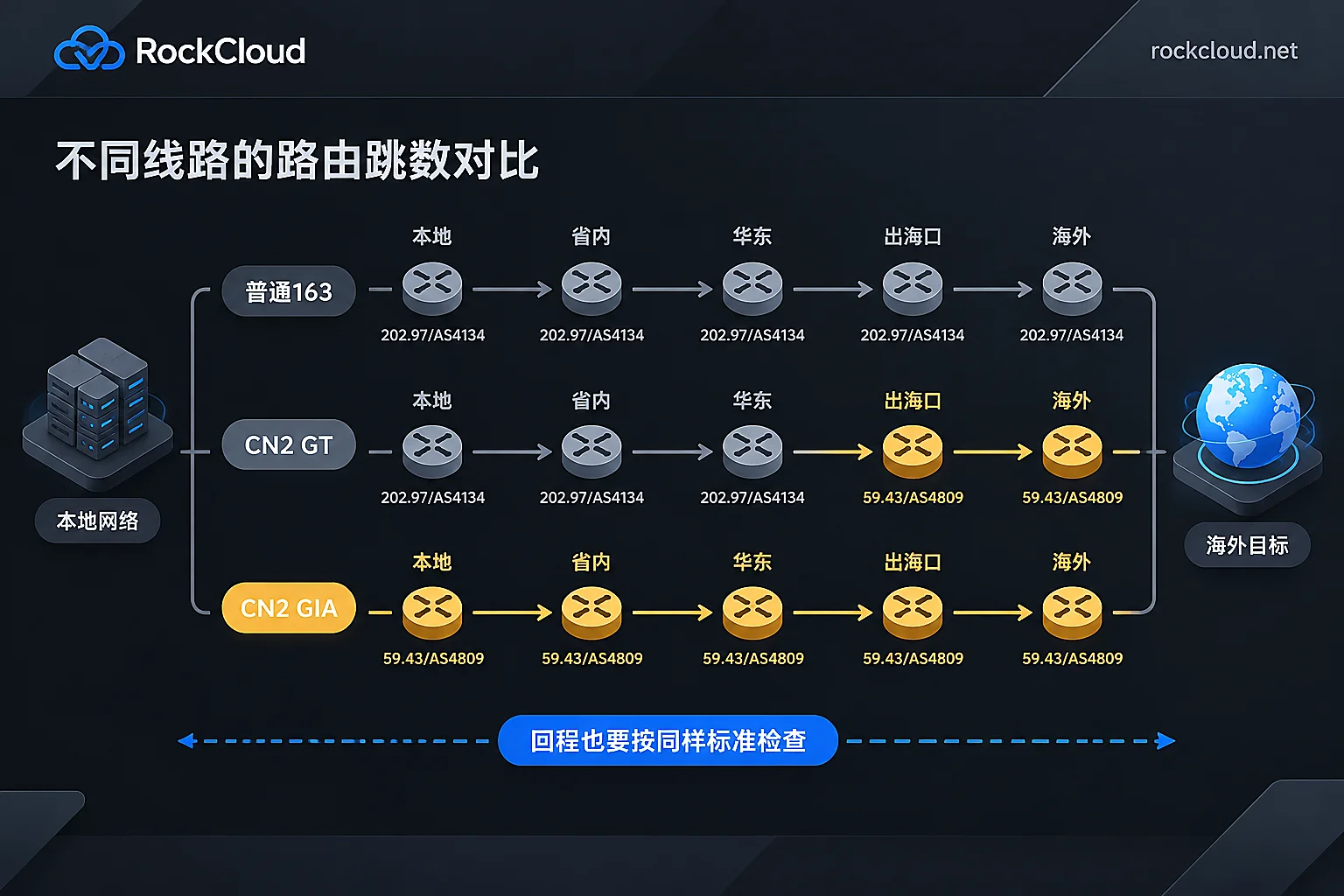
- Whether the route has CN2 characteristics: the ASN is AS4809, and node IPs are mostly 59.43.*.*. If the entire path only shows 202.97.*.* (AS4134, China Telecom's 163 backbone), it's an ordinary 163 line.
- Whether the return path also uses CN2: having CN2 only on the outbound path while the return path uses 163 is the most common form of mislabeling. Users' experience when opening web pages and downloading resources mainly depends on the return path.
- Whether it's stable during peak evening hours: retest between 20:00 and 23:00 and check latency jitter and packet loss.
Only when all three pass can you treat it as genuine CN2. You also need to distinguish whether you bought CN2 GT or CN2 GIA.
First, recognize what the three types of routes look like
| Line | Domestic backbone segment | Overseas segment | Key point for identification |
|---|---|---|---|
| Ordinary 163 | 202.97.*.* (AS4134) | 202.97.*.* | 59.43 never appears along the entire path |
| CN2 GT | Still uses 202.97.*.* | Enters 59.43.*.* only at the exit | 202.97 and 59.43 appear together |
| CN2 GIA | 59.43.*.* (AS4809) | 59.43.*.* | The backbone segment does not pass through 202.97 |
Some providers sell CN2 GT as CN2 GIA. GT routes can also show 59.43, so concluding based only on seeing 59.43 makes it easy to get fooled; you need to check whether 202.97 appears before 59.43. For the difference between the two during peak evening hours and trade-offs in selection, see What's the difference between CN2 GIA and CN2 GT.
Prepare three things before testing
- Target IP: for a server, use the server IP. If it's a CDN or acceleration service, first resolve your domain name and get the node IP actually assigned to users; don't test the provider's official website IP.
- Test network: first test with a China Telecom broadband or mobile connection. CN2 is China Telecom's network, so testing from China Telecom is the most telling. Test China Unicom and China Mobile separately, as discussed later.
Tools:
- Linux/macOS:
mtr -r -c 100 目标IP, adding the-zparameter can show the ASN of each hop;traceroute -n 目标IPcan also be used - Windows:
tracert -d 目标IP, or tools like BestTrace that directly label ASNs and locations - For testing the return path: use the Looking Glass (probe page) provided by the provider, or execute directly on the server if you can log in
- Linux/macOS:
Step 1: Test the outbound path (you → target)
From a China Telecom network, run MTR or Traceroute against the target IP, and read from top to bottom:
- The first few hops are the local network and provincial nodes, so ignore them for now.
- After entering the backbone, see whether 59.43 or 202.97 appears, and whether the ASN is AS4809 or AS4134.
- Compare against the table above to determine whether it is 163, GT, or GIA.
A case that is easy to misjudge: many cities do not have a local CN2 backbone node; only core hubs such as Beijing, Shanghai, Guangzhou, and Chengdu are connected. When testing in these places, the first few hops may first aggregate through local 163 nodes and then enter 59.43. This does not necessarily mean fake CN2; you need to see which network is used after entering the long-distance backbone segment.
Step 2: Test the return path (target → you); this step is the most critical
Testing only the outbound path is not enough. The "one-way CN2" approach is to use CN2 on the outbound path for easy screenshots in marketing, while the return path uses ordinary 163 or even detours. The outbound path may look fine, but actual use will still be slow.
How to test:
- Open the provider's Looking Glass, or log in to the server.
- Run MTR or Traceroute against your local China Telecom public IP. You can also run it against a China Telecom test IP, but it's best to choose one in the province where your users are located.
- Use the same standard to inspect the path: the return path should also go through 59.43.*.* / AS4809 back to China and should not fall into 202.97 along the way.
If the provider neither provides Looking Glass nor gives you a test machine, and is unwilling to help you run return-path traces, treat this as a risk item during procurement.
Step 3: Retest during peak evening hours
Even if the route is correct, you still need to see actual carrying capacity. 20:00–23:00 is the most congested period for domestic exit traffic. It is recommended to run several consecutive tests with a sample size of mtr -r -c 200 or more, focusing on three things:
- Packet loss at the endpoint: real CN2 GIA has independent capacity and priority guarantees, so peak-hour packet loss can usually be kept within 1%. Ordinary lines or fake CN2 commonly see 5%–15% or even higher packet loss during this period. These are only common situations, not hard standards.
- Whether latency increases multiples: compared with daytime, if average latency doubles, that indicates congestion.
- Jitter: look at the StDev (standard deviation) column in MTR results. A large gap between daytime and nighttime values indicates the line cannot hold up during peak hours.
For reference latency values from different regions to Hong Kong, the US West, and elsewhere, compare with What latency is normal for a Hong Kong CN2 server.
When reading MTR, note: if an intermediate hop shows packet loss but the endpoint does not, it generally does not count as real packet loss. Many routers rate-limit ICMP responses; this kind of loss is caused by "not replying to packets," not by "being unable to forward." A hop showing * works the same way. Judge packet loss based on the endpoint and the last few hops.
Step 4: Look at China Telecom, China Unicom, and China Mobile separately
CN2 is China Telecom's network, so traffic from China Unicom and China Mobile users will not use AS4809 in the first place. Therefore, when "three-network CN2" is advertised, the actual situation is usually: China Telecom uses CN2, while China Unicom and China Mobile use direct connections on their own backbones or transit through third-party interconnection.
This itself is not fraud; the problem is whether the China Unicom and China Mobile segments perform well. Separately use China Unicom and China Mobile networks (or corresponding test IPs) to repeat the outbound and return-path tests, checking whether traffic detours to other regions, whether it passes through third-party transit, and what latency and packet loss are like during peak evening hours. Focus testing on whichever carrier your users mainly use.
What to ask the provider before purchasing
- Test IPs or test nodes, and the testing period should cover at least several peak evening hours
- Looking Glass or return-path trace results, for all three carriers
- Written specification of the line type: whether it is CN2 GIA or CN2 GT, and whether it is bidirectional or only one-way
Only if these items can all be provided and match the test results can the marketing be trusted.
If what you need is CN2 acceleration, not to buy a server
Many websites, APIs, and gaming services actually need "faster and more stable access for domestic users to overseas origin sites," and do not necessarily need to switch to a CN2 server. In this case, you can put a layer of CN2 acceleration in front of the origin. RockCloud's CN2 China Acceleration provides three-network direct connections and filing-free access, with acceleration and DDoS/CC defense completed on the same link, so the cost is counted only once. It supports free testing. During the test period, it is recommended to take the assigned node IP and run all four steps above; sign the contract only after you are satisfied with the peak-hour and return-path results. For plans and test applications, see the pricing page.




Comments(0)