 RockCloud-基石云安全-官方博客
Conclusion first: When a payment callback is blocked by the WAF, the correct approach is not to whitelist the entire domain or disable the WAF, but to follow three steps—find out exactly which module and rule blocked it in the interception logs; configure an allow rule only for the callback endpoint path, only for the payment platform's official IP range, and only skip the hit module; then resend the notification in the payment platform backend and check the logs to confirm the allow rule is effective. The whole process usually takes about ten minutes. Let's break it down in this order.
First Confirm It's the WAF
Typical symptoms: The user has already paid successfully, but the order status in your system hasn't updated; the WeChat Pay merchant platform or Alipay backend shows 'notification failed' or 'merchant returned non-200', and retries still fail; and your application logs show no sign of receiving this callback request. If the request never reached the application layer but disappeared at the boundary, and you've just integrated a WAF, you can basically narrow it down to the WAF.
Looking at the response code recorded by the payment platform can further narrow it down: a 403 usually indicates rule interception or IP/geographic blocking; a 405 or an HTML page with JavaScript is likely Bot protection issuing a browser challenge to the callback—payment institution servers are not browsers and can't run JS, so they naturally can't pass.
Step 1: Check Logs to Get Module and Rule ID
Go to the WAF console's security events, attack logs, or interception reports, and filter with three conditions: the time period of the callback failure, the callback endpoint URL (e.g., /api/pay/notify), and the source IP of the payment platform. You need to note three things:
- The action is Block or Challenge;
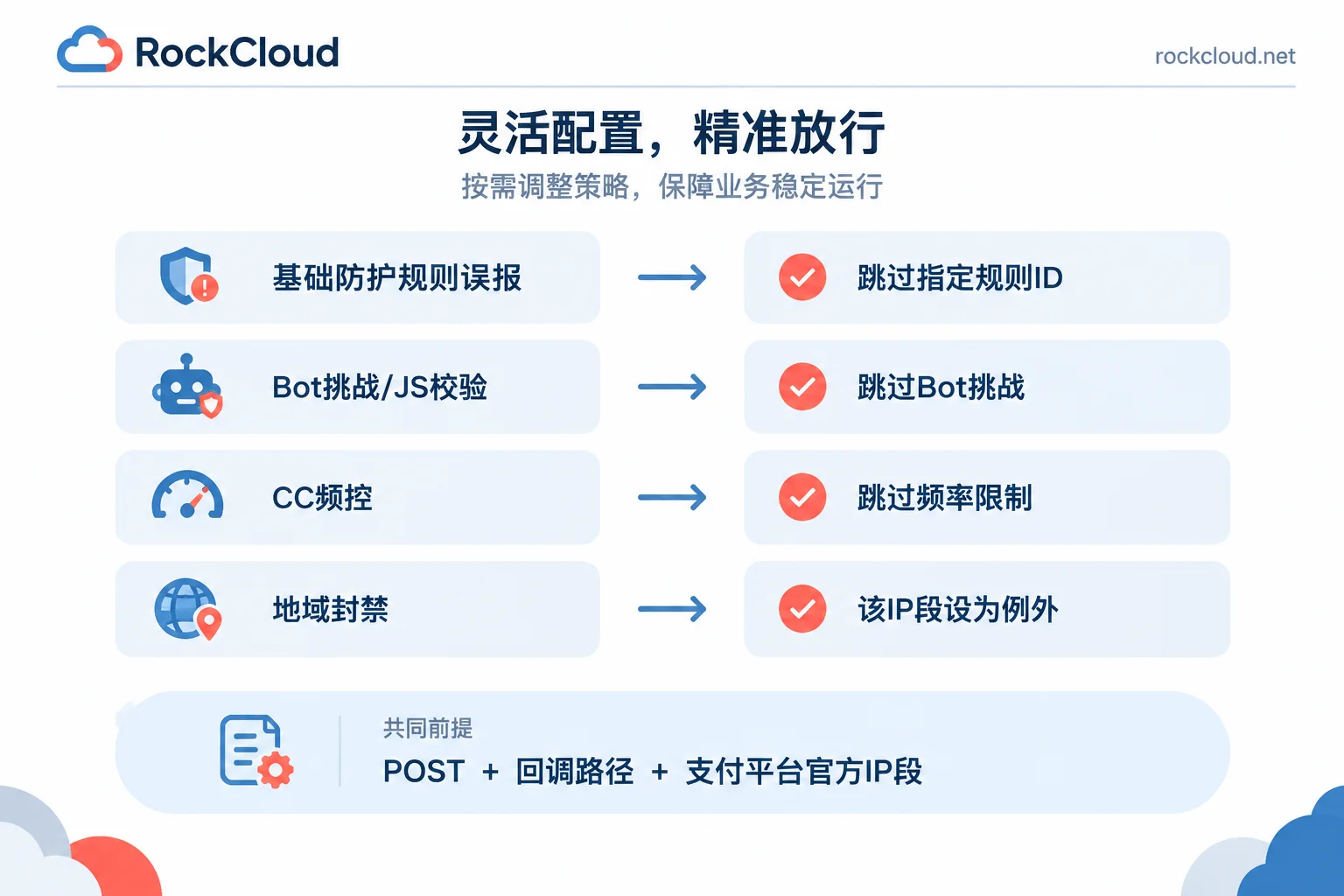
- The hit protection module: Web Basic Protection (SQL injection, XSS, WebShell rules), Bot Management/JS Challenge, CC Protection/Rate Limiting, or Geographic Blocking;
- The specific rule ID.
This step cannot be skipped. There are only a few reasons why a payment callback gets blocked, but the corresponding handling methods differ. Without checking logs, you can only guess. A wrong guess either doesn't allow it through or allows too much.
Four common causes and corresponding modules:
- The callback request body is XML or JSON with signature ciphertext, Base64 strings, escape characters, and is misjudged by basic protection rules as injection or WebShell characteristics.
- Bot protection or browser integrity check is enabled, and the callback party cannot complete the JS challenge.
- During major promotions or batch refunds, callbacks have high concurrency in a short period, triggering CC rate limiting.
- Cross-border payment gateways initiate callbacks from overseas IPs, hitting geographic blocking policies.
Step 2: Configure Whitelist with Minimum Scope
The whitelist must follow two principles: conditions are combined with 'AND', and the allow action only targets the hit module. Whitelisting the entire site or just filling in a domain without any restrictions is equivalent to leaving a bypass channel for attackers—this must be absolutely avoided.
It is recommended to satisfy all three matching conditions:
- Request method = POST (payment callbacks are almost always POST);
- URL path exactly matches or prefix matches the callback endpoint, such as
/api/pay/notify/*, do not write/api/*; - Client IP belongs to the payment platform's published callback IP range. WeChat Pay explicitly requires merchants in its official integration documentation to open its published callback network segments on firewalls and WAFs; for Alipay and other channels, refer to their respective official documentation for published IPs.
If a channel does not provide fixed IPs or the IPs change dynamically, replace the IP condition with a specific request header (Header) agreed upon by both parties as an identifier, such as a fixed header field and value from the channel, also combined with method and path.
Match the allow action to the module:
- Basic protection rule false positive: Prefer 'skip specified rule ID for this path'; only when multiple rules cause false positives alternately, step back to 'skip the entire Web Basic Protection module';
- Bot challenge interception: Skip Bot Management/JS Challenge/browser verification for the callback path;
- CC rate limiting interception: Skip rate limiting or CC protection for the callback path, or set a higher threshold specifically for this path;
- Geographic blocking: List the IP range of the payment gateway's region as an exception, rather than lifting the entire geographic policy.
Different vendors have different console names: some call it 'whitelist template' or 'false positive shielding', Cloudflare calls it Skip rules, and others have separate entries like 'Web Intrusion Protection Whitelist' and 'Bot Whitelist'. The name doesn't matter; what matters is whether it skips the entire chain or a specific module—only skip the one you saw in the logs.
If your site is connected through a service like RockCloud where acceleration and protection are on the same link, the WAF rules, interception logs, and CDN are in the same panel, and you can configure path, IP, and module conditions in one place. For specific rule items, refer to the RockCloud WAF page. When unsure, having technical support look at the logs with you is faster than repeated trial and error.
Step 3: Resend Notification to Verify, Then Restore Business-Layer Signature Verification
After saving the rule, don't wait for the next real order. Go to the payment platform merchant backend, find the failed notification and manually resend it, or run a test order through the payment process again, then return to the WAF logs to confirm the action for this request has changed to 'Allow', and the application logs show the callback was received. If it's still blocked, go back to step 1 and check new logs—sometimes after allowing one rule, another rule behind it is exposed; handle them one by one.
One final point is very important: The whitelist only lets the request in; it does not mean the incoming request is trustworthy. After opening the IP range, your callback handling logic must still perform signature verification for every notification, and any verification failure should not update the order. WeChat Pay's integration specification states this clearly, because IPs can be forged, the whitelist itself is an exposure, and signature verification is the last line of defense. A path that skips WAF detection is equivalent to handing that part of the security responsibility back to the application code.
Temporary Handling When You Can't Check Logs in Time
If order backlog is severe and you can't find the specific rule right away, you can create a temporary rule: only for the callback path, only for the payment platform IP range, skip the hit module (if unsure, skip both Web Basic Protection and Bot Challenge) to restore the order channel first. After traffic stabilizes, go back to the logs to locate the specific rule ID and narrow the temporary rule to rule level. Remember to add notes and a processing deadline to temporary rules, so that half a year later no one wonders why it exists or whether it should remain.
After launching a new payment channel or upgrading the WAF rule library, the callback path is worth adding to routine checks: run a test order and check the interception log once. It's much less hassle than waiting for a customer to complain 'I paid but didn't get the goods.'