 RockCloud-基石云安全-官方博客
The first step in Nginx anti-CC attack rate limiting best practices is to define two shared memory zones in the http block—one for connection limits and one for request rate—then implement a four-part strategy: "connection fallback, rate smoothing, burst buffering, and whitelist exemption." According to Radware's 2026 threat analysis report, web application and API attacks grew by 187.1% year-over-year, and distributed real residential proxies make low-frequency CC attacks harder to block with fixed thresholds on a single machine, so this configuration needs a fresh look.
Conclusion First: The Three Modules of Nginx Anti-CC Rate Limiting Best Practices and Their Order of Operation
The Nginx anti-CC rate limiting best practice is a four-part approach: "limit_conn for concurrent connections + limit_req for rate control + burst/nodelay to buffer bursts + geo/map whitelist exemption." Order of operation: After a connection is processed and the request header is fully read, it first counts toward the limit_conn concurrent connection count; if exceeded, it is rejected. Then it enters the limit_req leaky bucket, which queues requests according to the rate; if the burst queue is exceeded, it returns a denial. Whitelisted IPs bypass both modules by using an empty key.
Limit Connections or Requests: The Characteristics of Two Types of CC Traffic Determine Which to Configure First
To answer a common question: what is the difference between nginx limit_req and limit_conn? limit_conn limits the "number of connections currently being processed" and only counts after the connection has fully read the request header; limit_req uses the leaky bucket algorithm to limit the "request rate allowed per second." The defense targets differ: for slow connection exhaustion, use limit_conn first to suppress; for short-lived high-frequency requests, use limit_req first to rate-limit. In reality, the two often mix, so both should be used together. The table below provides a decision guide:
| Traffic Pattern | Priority Configuration | Reason |
|---|---|---|
| Connection count surges, connections are occupied | limit_conn | Directly suppress concurrent connections, prevent handle exhaustion |
| Huge request volume but short connections | limit_req | Control rate, prevent CPU saturation |
| Both | First conn, then req | Stabilize concurrency first, then smooth the rate |
For slow connection exhaustion attacks, refer to the special handling in Slow CC Attack Protection.
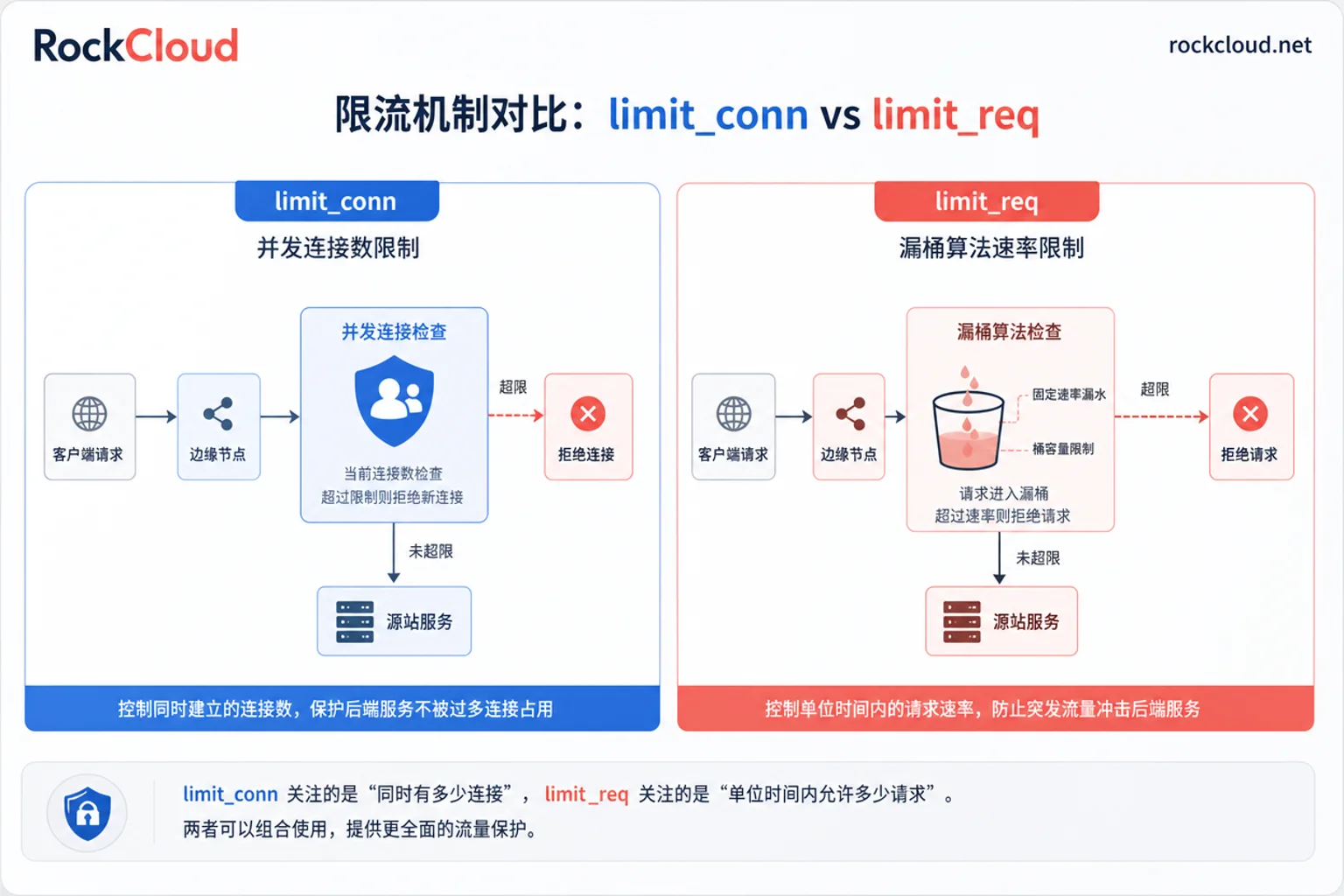
Module 1: limit_conn Sets Per-IP Concurrent Connection Quota
Define a shared memory zone in the http block and enable it in the server or location block:
http {
    limit_conn_zone $binary_remote_addr zone=perip_conn:10m;
    server {
        limit_conn perip_conn 20;
        limit_conn_status 429;
    }
}$binary_remote_addrcounts per IP; the shared memory zone stores state by key. Official documentation for limit_req_zone says 10m can store approximately 160,000 32-byte states. The memory estimate for limit_conn can be similar; actual sizing should be based on load testing with real key counts.- If limiting by domain, change the key to
$server_name, but note that CDN origin IPs will concentrate to a few egress points, so per-IP quotas should be relaxed. limit_conn_statusdefaults to 503; it is recommended to change it to 429 for better semantics.- Behind NAT or mobile networks, a single public IP may represent many real users, so the value should not be too small; it is best to load test and observe before setting.
Module 2: limit_req Leaky Bucket Rate and Three Combinations of burst/nodelay Effects Compared
First, see a copyable snippet:
http {
    limit_req_zone $binary_remote_addr zone=perip_req:10m rate=10r/s;
    server {
        location /api/ {
            limit_req zone=perip_req burst=20 nodelay;
        }
    }
}
How to set nginx burst and nodelay parameters? Different combinations behave very differently, so you must choose based on the interface characteristics:
| Configuration | Behavior | Suitable Scenario |
|---|---|---|
| Only rate | Requests exceeding the rate are immediately rejected, no buffering | Static resources, tolerable request loss |
| burst=N without nodelay | Burst requests queue, processed at a fixed rate, possibly timing out | Background tasks not sensitive to latency |
| burst=N nodelay | Burst requests within quota are processed immediately; exceeding is rejected immediately | Dynamic APIs, login interfaces |
| burst=N delay=M | First M requests are without delay, subsequent ones are rate-limited smoothly | Flash sales, spike scenarios |
Note: If nodelay is not used and burst is set very large, a large number of queued requests can cause client timeouts and disconnections, which is worse than directly returning 429. So do not increase burst indefinitely; start small and gradually widen.
Module 3: Whitelist and Custom Rejection Response to Avoid Blocking Search Engines and Payment Callbacks
Many ops find that after configuring rate limiting, normal users get 503. Use geo+map to map whitelisted IPs' rate-limiting key to an empty string, which does not participate in counting, thus bypassing rate limiting:
geo $whitelist {
    default 0;
    8.8.8.8 1;
    203.0.113.0/24 1;
}
map $whitelist $limit_key {
    1 "";
    default $binary_remote_addr;
}
limit_req_zone $limit_key zone=perip_req:10m rate=10r/s;
Also change the rejection status code to 429 and use error_page to return a readable message and Retry-After header:
limit_req_status 429;
error_page 429 /rate_limit.html;
location = /rate_limit.html {
    default_type application/json;
    add_header Retry-After 30 always;
    return 429 '{"error":"Too Many Requests"}';
}
This way, search engine crawlers (e.g., Googlebot) and payment callback IPs can be whitelisted to avoid false positives.
How to Verify After Configuration: Log Fields, Load Testing Methods, and Three Metrics to Watch
After putting the Nginx anti-CC rate limiting best practices into production, first check these three metrics: rejection rate, queue delay volume, and sources of false-positive complaints. After configuration, add $limit_req_status to log_format, then evaluate based on status distribution:
log_format main '$remote_addr $request $status $limit_req_status';PASSEDindicates normal pass,DELAYEDindicates queue delay,REJECTEDindicates rejection;- Use
awk '{print $1}' access.log | sort | uniq -c | sort -nr | head -20to quickly get the top list of independent IP requests from access.log to find the CC source IPs; - In the initial stage, observe for a while (dry-run mode) before gradually tightening thresholds;
- Continuously monitor three metrics: rejection rate (whether too high), queue delay volume (whether it affects experience), and false-positive complaint sources (whether there are whitelist gaps).
What Nginx Rate Limiting Cannot Block: Distributed Real IP Proxy Pools and Realistic Bots
Back to the question "Can Nginx defend against CC attacks?": Single-machine Nginx relies on IP-based shared memory counting. Against massive distributed residential proxies and low-frequency realistic requests, each IP's frequency is below the threshold, so they bypass it; meanwhile, shared memory, origin bandwidth, and system handles will be exhausted first. Radware's 2026 report shows that a large amount of attack traffic simulates normal users via residential proxies to launch low-frequency CC, so continuing to increase burst is not a solution. The capability boundary of single-machine rate limiting is here—it remains a fallback but cannot alone withstand industrialized, distributed CC attacks. For distributed low-frequency attacks, refer to the Application-Layer Attack Protection solution.
Division of Labor: Edge Quota Pre-movement and Origin Rate Limiting Fallback
When attack sources are highly distributed and per-IP frequency is difficult to threshold, edge-side request integrity validation, bot detection, and cross-region quota pre-movement are needed. RockCloud High-Defense CDN and intelligent WAF take on the cleaning layer before origin rate limiting, while origin Nginx rate limiting rules should remain as a final fallback. Related solutions can be found in Layer 7 DDoS.
The layered responsibilities are simplified in the table below:
| Layer | Responsibility | Method |
|---|---|---|
| Edge | Request integrity validation, bot detection, quota pre-movement | High-Defense CDN, intelligent WAF |
| Origin | Per-IP concurrent connection and rate fallback | Nginx limit_conn/req |
If logs show that attack sources are highly distributed, you can enable quota pre-movement on the RockCloud cornerstone cloud side, keep origin rules as a fallback, and enable intelligent WAF Protection on the edge.
FAQ
What is the difference between nginx limit_req and limit_conn?
limit_conn limits the number of concurrent connections and only counts after the connection has fully read the request header; limit_req limits the request rate using the leaky bucket algorithm. If connection count surges, prioritize limit_conn; if request volume is huge, prioritize limit_req; usually, they are used together.
After configuring rate limiting, normal users get 503. What should I do?
First, use geo+map to map whitelisted IPs' key to an empty string to skip counting, then change limit_req_status to 429 and use error_page to return a readable message. Check if CDN origin IPs or NAT egress IPs are being false-positively blocked, and if necessary, relax burst or rate.
How to set nginx burst and nodelay parameters?
Without nodelay, burst requests will queue with delay, possibly causing timeouts and disconnections; with nodelay, burst requests within the quota are processed immediately, and exceeding is rejected immediately. For dynamic interfaces, use a small burst with nodelay; for spike scenarios, use the delay parameter for two-stage rate limiting; do not increase burst indefinitely.
Can Nginx defend against CC attacks?
Single-machine Nginx can defend against some CC attacks based on single-IP high frequency or connection exhaustion, but it is limited against distributed residential proxy low-frequency realistic attacks. It should serve as a fallback, combined with edge high-defense CDN and WAF, to form a complete defense line.
Should rate limiting be per IP or per domain?
Per IP allows precise control of individual clients, but NAT egress can false-positive IPs shared by multiple users; per domain protects the entire site but cannot distinguish individual attackers. In production, per IP is common, with special handling for whitelist and CDN origin IPs.
How to find the IPs launching CC attacks from access.log?
Use awk '{print $1}' access.log | sort | uniq -c | sort -nr | head -20 to count high-frequency IPs, then filter based on status codes and request paths. Configure log_format to include $limit_req_status to distinguish between normal, delayed, and rejected request sources.




Comments(0)