 RockCloud-基石云安全-官方博客
When an attack is already hitting, the most common mistake when mounting a CDN isn't misconfiguring a parameter—it's getting the order wrong. Some people switch DNS first, only to discover the edge can't reach the origin, turning the site from "slow" to "completely blank." Others mount the CDN but don't touch the origin firewall, so the attack continues hitting the original IP and the scrubbing nodes are useless.
Below is the actual hands-on order.
Six steps: the big picture first
- Add the domain on the CDN side, configure the origin IP and port, origin-pull protocol, origin-pull Host, and certificate — this step doesn't touch live DNS, so mistakes won't affect the current setup
- Use local hosts to point the domain to an edge node and confirm the edge can pull from origin and pages load
- Change DNS: replace the A record with the CDN-provided CNAME, or change the entire domain's NS
- Lock down the origin: firewall allows only origin-pull IP ranges; replace the origin public IP if necessary
- Enable edge emergency protection: challenge mode, CC rate limiting, static cache fallback
- Check logs to verify: origin-pull request volume, edge block count, and origin connection count should match up
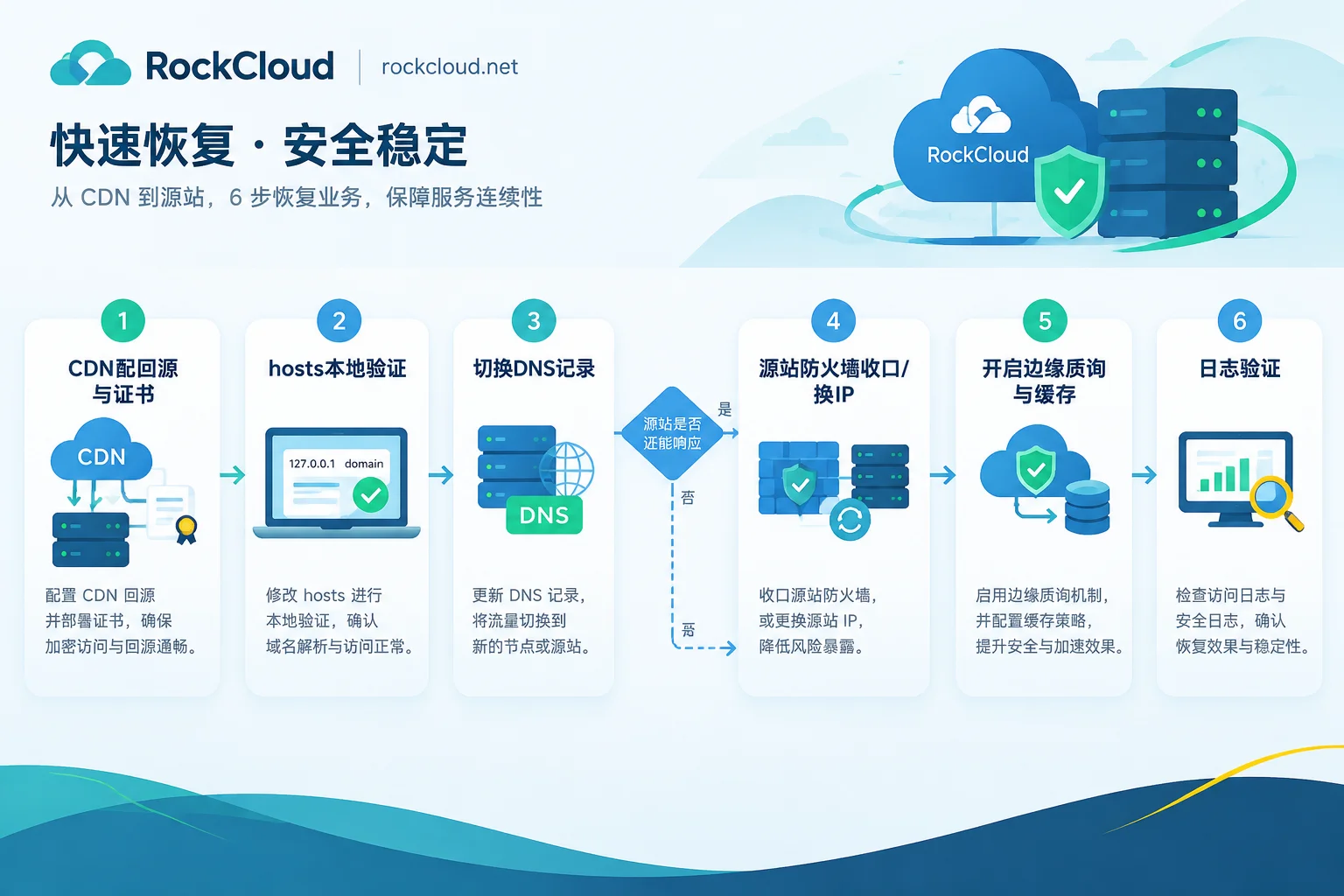
The order of step 3 and step 4 depends on whether the origin is still alive—covered separately below.
Step 1: CDN-side configuration—don't miss the origin-pull Host and certificate
When adding a domain, three items are most easily misconfigured during an attack:
Origin address and port. Enter the origin's real public IP and actual listening port. If there's a load balancer or reverse proxy in front of the origin, enter that layer's address, not the backend.
Origin-pull protocol. If the origin only has port 80 open, choose HTTP origin-pull; if the origin forces HTTPS redirect, choose HTTPS origin-pull. Typical symptoms of choosing wrong are an infinite 301 redirect loop or the edge returning 502.
Origin-pull Host. The default is usually the domain the user visits. If the origin uses Host-based virtual host configuration (Nginx server_name / Apache VirtualHost), the origin-pull Host must match the domain in the origin configuration; otherwise it hits the default site and returns an unrelated page or 404.
Certificate. HTTPS sites must deploy the certificate at the edge. The edge must terminate TLS here to see layer-7 plaintext and perform CC filtering. Either upload the existing certificate or enable the platform's free automatic certificate issuance. During an attack, time is tight, so automatic issuance is usually faster—but note that the issuance process may require domain ownership verification, and DNS verification can be done before you switch DNS.
Step 2: Before switching DNS, verify with hosts first
This step takes less than two minutes but can prevent most incidents.
Manually point the domain in your local hosts file to an edge node IP provided by the CDN (usually available in the console, or ping the CNAME to get the resolved result), then access it in your browser:
- Homepage loads, static assets have no mixed-content errors
- HTTPS handshake is normal, certificate chain is complete
- Log in once, submit a form once, confirm POST and cookies aren't dropped
- Admin or management paths are accessible
Only touch DNS after verification passes. If it fails, fix it on the CDN side—since live traffic hasn't been switched yet, you can change it as many times as needed without impact.
Step 3: Change DNS, and accept that it won't take effect immediately everywhere
Change the origin's A/AAAA record to the CDN-assigned CNAME, or change the entire domain's NS as required by the platform.
One thing must be made clear: DNS switch propagation speed is constrained by the original record's TTL. Thousands of recursive resolvers on the public internet have your previous record cached; they won't ask for the new value until the cache expires. If the original TTL was 86400 seconds, a significant portion of public requests will still go straight to the old address for the next full day in the worst case. What you can do during an attack is immediately set TTL to the minimum (many platforms support 60 seconds), but this new TTL itself won't take effect until the old cache expires.
So don't expect to "divert" attack traffic by changing DNS. Changing DNS only fixes the access path for legitimate users; attackers hold the IP and don't look at your DNS.
CNAME vs. NS: CNAME switches record by record, offering fine granularity and controllable impact—suitable when you only want to protect www and the main site while leaving other subdomains as-is. NS onboarding delegates the entire domain's authoritative resolution to the platform, taking effect domain-wide at once and allowing more flexible scheduling later, but propagation is affected by parent zone/registrar-level caches, and mail, verification TXT, and other records must all be migrated—missing one means a new outage. For the trade-offs, see Should You Change NS When Onboarding a High-Defense CDN.
Step 4: Lock down the origin—this step determines whether the CDN actually helps
During a large-scale attack, assume the attacker already knows your origin's real IP. Once DNS is changed, the flood directly hitting the origin IP won't decrease at all. Only by closing the entrance on the origin side does the scrubbing node truly become the sole entry point.
Do one or both of these:
Tighten access control. On cloud security groups or local iptables, restrict port 80/443 sources to the origin-pull IP ranges provided by the CDN vendor; DROP all other public sources. Management ports (SSH/RDP/database) should separately allow only your office egress IP. Vendors usually provide a list of origin-pull ranges, which may be updated occasionally; subscribe to changes after onboarding.
Change the origin public IP. If the origin is already completely unreachable due to network saturation, or has been blackholed by the upstream cloud provider, lockdown alone is too late—traffic has already filled the link before reaching your machine. In this case, switch to a new elastic public IP (EIP). After switching, the new IP goes only into the CDN's origin-pull configuration, and it must not appear in any public DNS records.
After changing IPs, check common leak points: historical DNS records (many lookup sites archive them), mail MX and SPF hostnames, subdomains like admin/test/API that bypass the CDN, and internal domains exposed in certificate transparency logs. Leaking even one of these makes the IP change pointless. For a complete origin-hiding checklist, see How to Hide Origin IP When a Gaming Server Is Under Attack; the approach applies equally to web sites.
Regarding the order of steps 3 and 4: if the origin can still hold up and pages are intermittently slow, switch DNS first and lock down once the edge starts pulling from origin—minimal loss. If the origin is completely down and you can't even SSH in, there's no need to wait: change the IP + allow only origin-pull ranges, then change DNS.
One more scenario to anticipate: if the origin has been blackholed by the cloud provider, origin-pull won't work until it's unblocked, and mounting a CDN won't save it. Blackhole trigger thresholds and unblock durations vary by provider; the only fast path is usually to change the IP or switch instances—check your cloud provider's rules.
Step 5: Edge emergency protection—be careful not to block your own APIs
Enable protection after connectivity is restored; if you do it in the wrong order, you might misjudge "site down" as "attack not blocked."
Layer-7 challenge. Enable browser environment verification or managed challenge for abnormal sources, blocking requests at the edge that can't execute JS or lack normal TLS fingerprints. This is the most direct defense against CC.
Rate limiting. Set thresholds per IP or per session for high-cost paths: login, search, checkout, CAPTCHA sending, any API that hits the database. Static resources don't need it.
Cache fallback. Increase cache levels for static resources; if necessary, ignore query string parameters for images, JS/CSS so that flood requests with random parameters also hit the cache and don't penetrate to the origin. But explicitly exclude logged-in pages, shopping carts, and user centers from caching—otherwise user data can cross-contaminate, which is more troublesome than downtime during an attack.
One exception you must keep: if your domain has public web APIs, app client endpoints, mini-program backends, or third-party callbacks (payment notifications, webhooks), a site-wide forced JS challenge or CAPTCHA will kill them outright—these clients don't run a browser and can't pass the challenge. The right approach is path-based segmentation: challenge page paths, and for /api/* and callback paths, use rate limiting plus feature rules (UA, signature headers, source IP range allowlists). For troubleshooting mistakenly blocked payment callbacks, see How to Whitelist Payment Callbacks Blocked by WAF.
Step 6: Verify—check three numbers
After onboarding, don't call it done just because "it loads." Go to the log panel and check:
- Edge request volume vs. origin-pull request volume: the difference is what caching and blocking stopped. If origin-pull volume is almost equal to edge volume, caching is basically not working
- Block/challenge counts: confirm protection rules are actually matching, not just configured but inactive
- Origin-side connection count: if lockdown succeeded, the origin should only see connections from origin-pull IP ranges. If you still see many unknown IPs, firewall rules aren't effective or other ports are exposed
For how to drill down from anomalies on the dashboard to individual requests, see How to View Traffic and Network Logs in the CDN Console.
If you don't yet have a usable high-defense account
The above process assumes you already have a platform where you can immediately add a domain. Registering during an attack, waiting for trial approval, and waiting for tickets often costs far more time than the technical work itself. RockCloud's acceleration and protection run on the same link, with flat-rate billing by peak and unlimited traffic, supporting direct activation and onboarding during an attack; if you're being hit right now, contact us here to get started. Prepare four pieces of information—domain, origin IP, whether HTTPS, and business type (web/API/game)—to save a round of back-and-forth.
For post-mortem, handle these matters later: keep TTL at a low value long-term for faster switching next time; compile a list of subdomains that bypass the CDN and close them one by one; and clean the origin's real IP from all publicly queryable locations. These tasks take ten minutes in peacetime but cost downtime during an attack. For overall triage priorities, see How to Quickly Restore Access When Your Site Is Under DDoS Attack.


Comments(0)