 RockCloud-基石云安全-官方博客
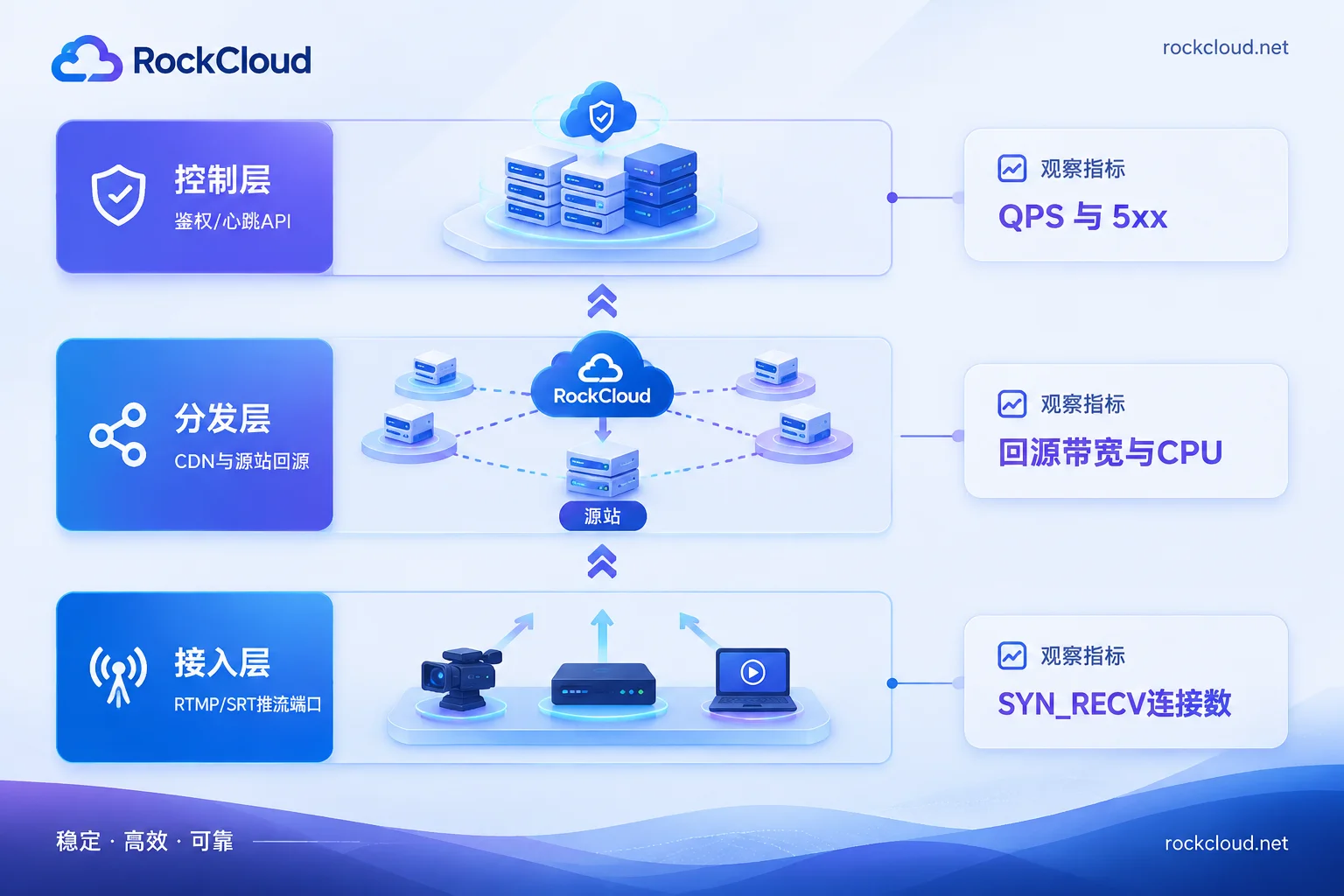
When a live room starts lagging and the streamer reconnects frequently, the first thing to do is not buy protection, but determine which layer is buckling. There are at least three independent points of failure in a live streaming pipeline, and the mitigation actions are completely different—getting it wrong wastes an hour:
- Control layer: Room heartbeats, push URL delivery, and authentication/reporting APIs are flooded with HTTP requests. The streamer's handshake fails and reconnects repeatedly, but the media stream itself is not saturated.
- Distribution layer: Malicious playback requests bypass the CDN and hit the origin directly, exhausting origin bandwidth and CPU. If push and pull services are co-located, both are dragged down together.
- Access layer: Push ports (RTMP 1935/TCP, SRT UDP ports, etc.) are exposed to the public internet and flooded with empty or malformed connections, exhausting connection counts or half-open queues, so new pushes cannot be established.
Below, we cover the sequence of diagnose → stop the bleeding → close the origin → harden, with each step doable during the incident.
Step 1: Identify the damaged layer within ten minutes
Check four sets of data simultaneously; whichever goes abnormal first is the current bottleneck:
- Push client logs. Read OBS, SDK, or ffmpeg errors carefully: connection refused/timeout indicates access layer or network issues; can connect but fails to get push URL or auth returns 4xx/5xx indicates control layer API problems; can push but uplink bitrate repeatedly drops to zero is more likely streamer uplink bandwidth or weak network, not necessarily an attack.
- API-side QPS and error rate. Isolate the "get push URL", "room status report", and "heartbeat" APIs: is QPS suddenly tens of times higher, are source IPs highly concentrated or abnormally dispersed, are UA and signatures largely missing? When the control layer is flooded, 5xx and response times here deteriorate before media metrics.
- Origin bandwidth, connection count, and CPU. If outbound bandwidth is maxed, TIME_WAIT/ESTABLISHED connections spike, and back-to-origin requests far exceed normal viewer count, it's likely playback-side penetration.
- Push port connection states. Many connections in SYN_RECV or established but sending no data, concentrated on port 1935, indicate access layer exhaustion by empty connections.
The point of this step: without distinguishing layers, adding WAF rules wildly does nothing for layer-4 port attacks; conversely, just changing origin IPs won't stop control layer flooding.
Step 2: Stop the bleeding by layer
Signaling and authentication APIs flooded
Apply fine-grained rate limiting on the affected APIs in WAF, not a blanket threshold: for APIs like get push URL and room status report, set frequency thresholds per IP, Session, or Token, with rate limiting before blocking.
A common pitfall: Web and native clients need separate policies. Browsers can use JS challenges or sliders; but native APIs called by apps and servers cannot use web challenges—clients lack a JS runtime, so enabling them causes mass false positives. For native APIs, validate signatures: discard requests without valid signatures or with malformed parameters.
After rate limiting, watch for blocking legitimate traffic: heartbeat APIs during peak hours may naturally have high QPS, so set thresholds based on off-peak real curves. If callback requests are falsely blocked after WAF integration, refer to WAF precise path-based allowlisting after false blocks.
Playback-side penetration crushing the origin
The typical method is adding random query parameters to playback URLs so every request is a "miss" and goes to origin. Two actions can immediately converge:
- Ignore irrelevant random parameters on CDN by normalizing the cache key, keeping only parameters that truly affect content. This way, requests with random tails hit the same cache and don't go to origin.
- Enable Request Collapsing, so only one origin request per resource goes out at a time, and others wait for that result. During a burst, this often protects the origin more effectively than rate limiting.
For segmented live (HLS/LL-HLS), check cache times: index files (m3u8) should have short cache based on segment duration, while segment files (ts/m4s) can have longer cache. Set based on your segment duration; too short equals self-inflicted origin requests.
If push and playback distribution share a machine, separate them after this incident—playback pressure should never affect whether streamers can push.
Push port occupied or stream key stolen
The push side must enable dynamic authentication: generate a signature (MD5 or HMAC) from the stream key + stream name + expiration timestamp, and only allow connections after server validation. This is how anti-leech works on platforms like Tencent Cloud Live. Parameters like txTime should be set short enough for the broadcast duration.
The expiration time is practical: a fixed push URL, once captured, can be replayed, or even preemptively used to occupy your stream name and channel resources, causing the streamer to be "pushed off". During an incident, if you suspect a leak, rotate the key and reissue URLs with new signatures—faster than adding network rules.
For empty connections at the port level, layer-4 scrubbing is the right tool—WAF and layer-7 CDN won't help here.
Step 3: Close the origin, don't do it in reverse
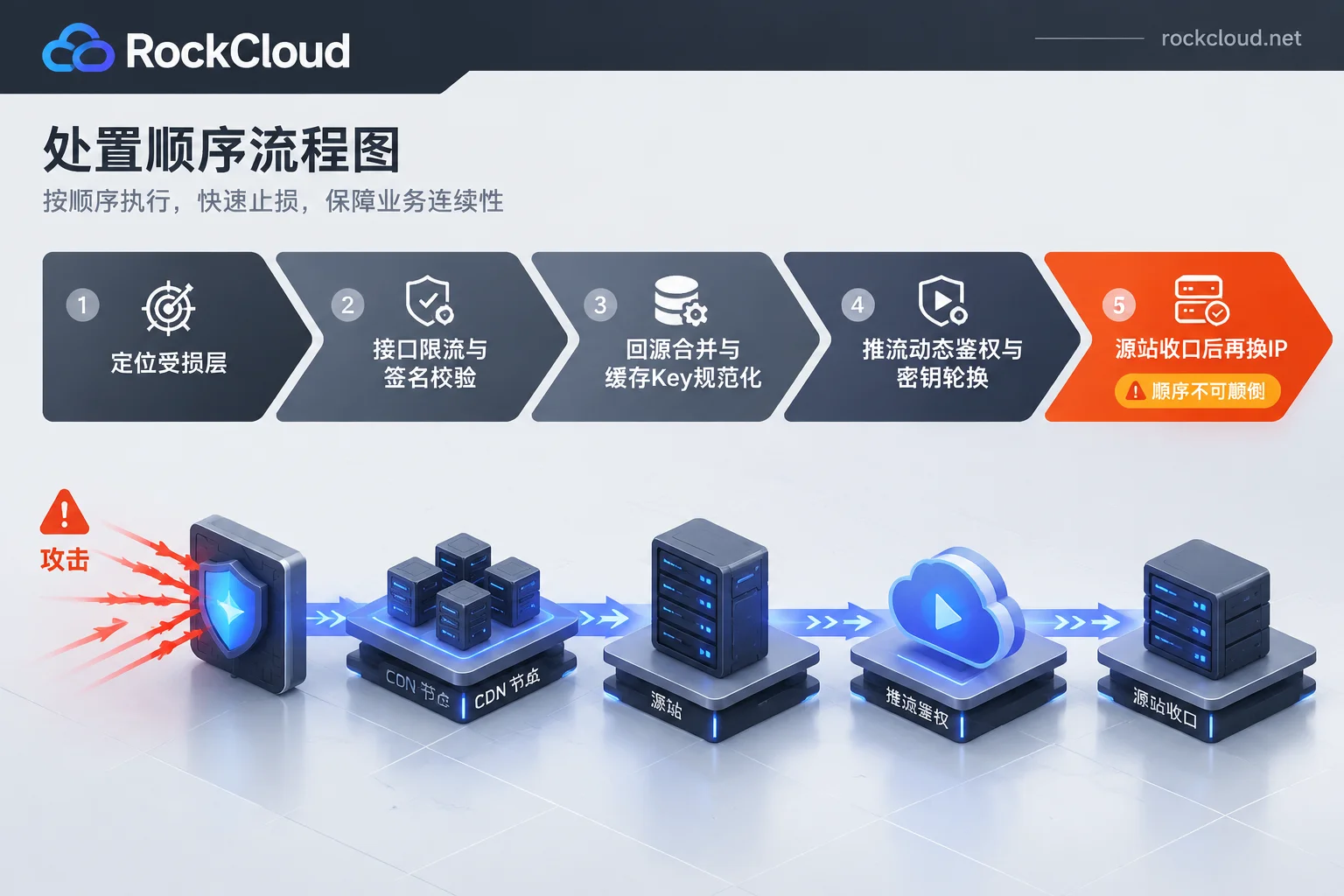
Many teams get this wrong: changing origin IP first, only to have the new IP attacked soon after. The correct order is close first, then change IP:
- Use security groups/firewalls to whitelist origin inbound, allowing only CDN or edge forwarder back-to-origin addresses; deny all else. Limit management ports (SSH, panel) to specific sources.
- Check for other real IP leaks: historical DNS records, mail services, other sites on the same IP, error page echoes, subdomains not behind CDN. If not cleaned, changing IP is futile. For a complete checklist, see how to hide your origin.
- After confirming the origin only accepts traffic from the protection chain, change the origin IP so old IP attack traffic goes nowhere.
For layer-4 long-connection pushes like RTMP/SRT, closing means streamers no longer connect directly to origin but to a layer-4 gateway or scrubbing node that supports TCP/UDP cleaning and origin hiding. If you're in a state where push ports are under attack and origin IP is exposed, encapsulation with private protocols and TCP/UDP origin hiding is the most direct way to restore the push channel; for incidents requiring human-assisted switching, emergency entry for ongoing attacks is faster than trial-and-error. Playback HTTP/HLS distribution still goes through CDN—handle the two paths separately.
Two things affect specific actions—confirm before acting
First, your push protocol. RTMP over TCP, SRT over UDP, and WebRTC/WHIP have different convergence configurations on layer-4 gateways: UDP scrubbing policies, session persistence, and MTU parameters must be confirmed separately, not copied from TCP. List protocols and ports clearly for the provider to avoid a round of back-and-forth. For whether UDP services can rely on CDN protection, see this criteria.
Second, your current topology. Self-built SRS/ZLMediaKit single-node origins versus services already on cloud streaming distribution differ greatly in emergency switching: the former can close via DNS and security groups, the latter requires knowing which parts are vendor-managed and which switches you control. Draw the topology before going live so you don't have to ask around during an incident.
Three things to add after the incident
- Decouple push and distribution: Separate push access, transcoding, and distribution at least in deployment, so one attack doesn't halt the entire chain.
- Normalize authentication: Dynamic signatures should not be enabled only during attacks; set expiration per session, rotate keys regularly, and log issuance.
- Traceable logs and alerts: Make three frequently watched curves for control layer API QPS, back-to-origin request volume, and push port connection count, with threshold alerts. These logs also help classify and trace attacks later; see DDoS attack log analysis and traceback.
Finally, a note on judgment: lag doesn't always mean an attack. Insufficient streamer uplink, cross-border jitter, or a normal traffic spike can look like CC. Check which of the four data sets goes abnormal first, then decide which layer to act on—this shortens recovery time more than any single protection switch.