 RockCloud-基石云安全-官方博客
When the origin IP is already exposed and attacks are hitting the server's public network, doing things in the wrong order wastes a whole cycle: changing IP without closing leak channels means the new IP will be discovered again within half a day; integrating protection without containment lets attackers bypass the nodes and connect directly to the old IP. The only viable sequence has three stages — first contain and stop the bleeding, then close all leak paths and change the IP, and finally encapsulate access by protocol type so that no reachable path to the origin exists on the public internet.
Below, we expand in the order of actions, highlighting the special aspects of card game services (TCP/UDP long connections, clients easily reverse-engineered for packet capture).
First, confirm which state you are in — this determines whether the first step is possible
Spend two minutes to assess before acting:
- The origin is still reachable, SSH/console available: This means attack volume hasn't saturated the bandwidth yet. You can immediately apply access control containment — the fastest visible step.
- Already blackholed by the ISP or cloud provider (routing-level ban): At this point, changing any firewall rule won't restore service; blackholing drops packets upstream. What you need is to prepare an IP change plan and switch as soon as the blackhole window lifts, or directly request a new public IP.
- Only players can't connect, server load is normal: Suspect CC or connection exhaustion attacks first, rather than pure bandwidth saturation. The focus is on gateway-side connection rate limiting and behavior identification. Hiding the origin is still necessary, but you don't need to rush an IP change.
Step 1: Contain access control on the origin side
Change security group or host firewall policies to default deny, whitelist allow:
- Only allow the back-to-origin IP ranges of protection nodes (ask your provider for their back-to-origin ranges; keep this list on file and update it when changes occur).
- Only allow the fixed egress IP of your operations jump host for SSH, database management, and monitoring collection.
- Close all unnecessary ports, especially game service ports temporarily opened for debugging, public listeners for Redis/MySQL, and admin panels.
- Deny all other direct public connections.
This step takes effect quickly on the origin side and immediately blocks direct probes and most application-layer requests from attackers using the leaked IP. But understand its limits: traffic-based attacks that already saturate ingress bandwidth cannot be saved by rule blocking — packets are dropped upstream. Containment only buys a clean starting point for the subsequent IP change and protection integration.
In card game services, there's a common pitfall: many server processes rely on UDP heartbeats or custom port ranges. A blanket port-range block during containment can disconnect all live tables. List the actual ports and back-to-origin sources used in production before making changes, and watch the online user curve after applying them.
Step 2: Find out how the IP leaked and seal it off
Changing IP without completing this step is like getting a new phone number and still being found. Common leak points in card game projects:
- Hardcoded origin IP or domain in the client. Reverse-engineering the installer, inspecting config files, or simply capturing a login packet reveals the real connection target. This is the primary leak in card game scenarios and the hardest to fix by configuration alone — it must be solved by encapsulation later.
- DNS historical resolution records. The domain pointed to the origin IP before protection was integrated, and historical DNS databases retain that. Before changing IP, confirm all A records, including long-unused subdomains, already point to protection nodes.
- Unprotected subdomains and test environments. Admin panels, payment callback URLs, update servers, test servers, monitoring dashboards often resolve directly to the same machine or IP range. Internet-wide scanners (like Censys) actively index these open ports and certificate information. Attackers can reverse-lookup domains in certificates to find the origin.
- Outbound connections from the server exposing the egress IP. System emails, third-party payment callbacks, SMS gateways, error reporting — any request initiated by the origin lets the recipient log the real egress IP. Route such outbound traffic through dedicated egress machines or proxies.
- Emergency actions during an attack. Temporarily opening a port or switching a domain back to the origin for troubleshooting — if you forget to roll back, all previous work is wasted.
For investigation methods and a more detailed exposure checklist, go through How to Hide the Origin? From Exposure Surface to mTLS Back-to-Origin: 5 Gates item by item; if you need the overall emergency tempo after confirmed leakage, the containment sequence in Emergency Handling and Remediation Steps After Origin IP Leakage can be referenced in parallel.
Step 3: Change the public IP and move core nodes into the private network
After confirming all leak channels are sealed, change the origin's fixed public IP. While doing so, adjust the architecture by one layer:
- Core nodes such as game logic servers, databases, and caches no longer hold public IPs, only private addresses.
- Externally, only keep a front layer (SLB, reverse proxy, or the back-to-origin target of a protection gateway) that forwards to the private network.
- Admin access goes through a jump host or internal VPN, not through public management ports.
Thus, even if a future leak occurs, what leaks is a replaceable front layer, not the core machine holding game data and player accounts. After changing IP, don't forget to update the protection platform's back-to-origin configuration, monitoring whitelists, and third-party callback addresses.
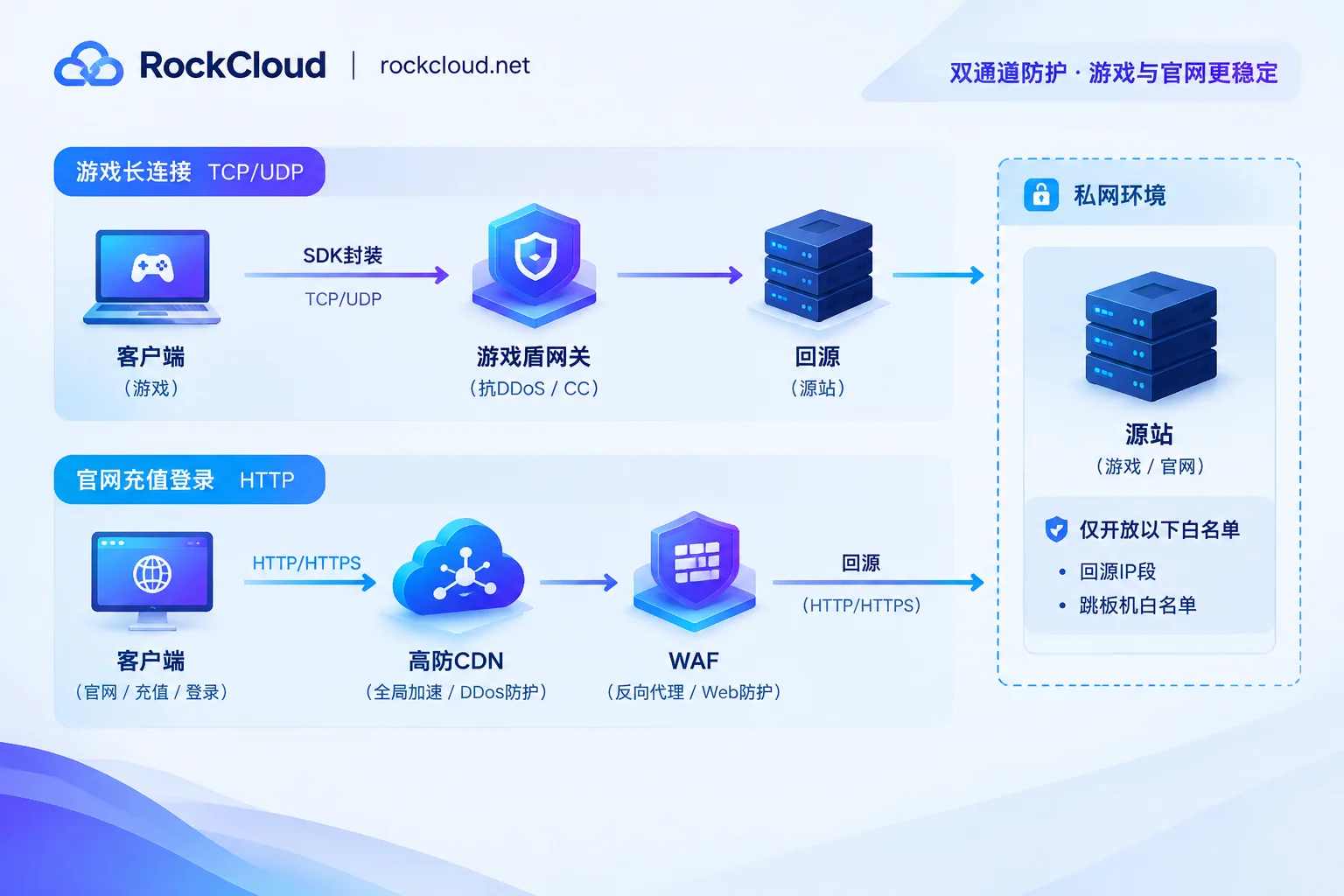
Step 4: Integrate by channel — card games need two separate paths
Card game traffic naturally splits into two types, each requiring different protection. Mixing them causes problems.
Game long connections (TCP/UDP) go through game shield. The principle: the client no longer connects directly to the origin but establishes an encrypted tunnel with distributed gateway nodes via SDK or launcher encapsulation, carrying game data over a proprietary protocol. The scheduling layer distributes requests across multiple gateway nodes. The client only sees gateway addresses or scheduling tokens; packet capture cannot reveal the origin's real IP. When a node is attacked, you can switch nodes. The design should strive not to interrupt established long connections — for card games with extremely low tolerance for mid-game disconnections, this is more important than peak numbers and should be a key test item.
Integration depends on the client form, which you must confirm before selecting a solution:
- Native app: Embed SDK. Changes are on the client side, requiring a new version and considering a transition period for old users.
- Micro client/launcher: The launcher performs dynamic encapsulation. The main client may need little or no changes — suitable for projects where forced updates are inconvenient.
- H5 or unable to modify client temporarily: Use Layer 4 port forwarding as a stopgap. The origin IP can be hidden, but if the client still contains direct-connect logic, risks remain. This is a temporary solution.
Official website, registration/login, top-up, admin panel, APIs go through high-defense CDN + WAF reverse proxy. This part is HTTP(S) traffic, integrated by domain, with the origin only allowing back-to-origin ranges. Also add two details on the origin and front layer: disable ICMP responses (no ping reply) and reject requests with empty Host or invalid SNI — such requests are almost always scanners probing what sites you host.
For how to divide the two channels and when one alone suffices, see How to Choose Between Game Shield and High-Defense CDN. If your services are overseas and use many UDP heartbeats, confirm the line's UDP policy before integration; see Pros and Cons of Overseas High-Defense IP Blocking Overseas UDP Traffic.
To actually implement this step, you can directly look at RockCloud's Game Shield integration (proprietary protocol encapsulation, TCP/UDP, origin hiding). Acceleration and protection are completed in the same link, billed by peak with unlimited traffic, and free testing is available before launch — card game projects must run through disconnection reconnection and table state during node switching in the test period before deciding on production cutover. If you are currently under attack and the origin is blackholed, organize your domain, ports, client form, and current attack behavior and go through Emergency Integration — faster than repeatedly changing IP yourself.
Step 5: Verification that must be done after the change
Don't assume you're invisible after integration. Confirm each item:
- Scan the new IP with external tools to confirm game ports, management ports, and database ports are all unreachable; only back-to-origin sources can connect.
- Access the web service directly by IP; it should return a rejection or empty response, not your site's homepage.
- Capture a client login packet; confirm the connection target is a gateway address and the packet contains no origin IP or internal identifiers.
- Check DNS resolution for all subdomains, including test, admin, update, and payment callback; confirm none still point to the origin.
- Check the domain list in SSL certificates; don't let certificates expose internal domains.
- Add a monitoring alert: notify when the origin receives connection attempts from non-whitelisted sources (via RockCloud's log panel and Telegram push). This is the earliest signal of another IP leak.
Why some still get attacked after changing IP
If it recurs after remediation, it's usually one of the following. Check in order of probability:
- Missed a subdomain or test environment without protection, still resolving to the same IP range.
- Temporarily opened ports or temporary DNS switches back to the origin during the emergency were not rolled back.
- Old client versions still have the direct-connect address active, and new version coverage is insufficient.
- The server's outbound egress wasn't changed; the other party obtained the new IP through callback records.
- Internal information leak — this cannot be detected at the rule level; look at who started precisely targeting the new IP and when.
If the attack precisely follows within hours of the IP change, the leak source is likely still in the client or internal, not random scanning. Don't rush to change IP again; align the earliest batch of sources and timestamps hitting the new IP with your change records of the day — often you can pinpoint the specific link. For layered forensics, see DDoS Attack Log Analysis and Traceback Investigation Methods.




Comments(0)