 RockCloud-基石云安全-官方博客
Whether a seamless high-defense CDN integration is successful depends on three conditions: zero business downtime during the migration, no interruption of HTTPS certificates, and no increase in origin error rates. Only if these three are met can it be truly seamless. Achieving this is not difficult—the key is to prepare the origin and origin-return layer first, and only touch DNS last — if the order is wrong, even the best high-defense CDN won't save you from on-site 502s and SSL errors.
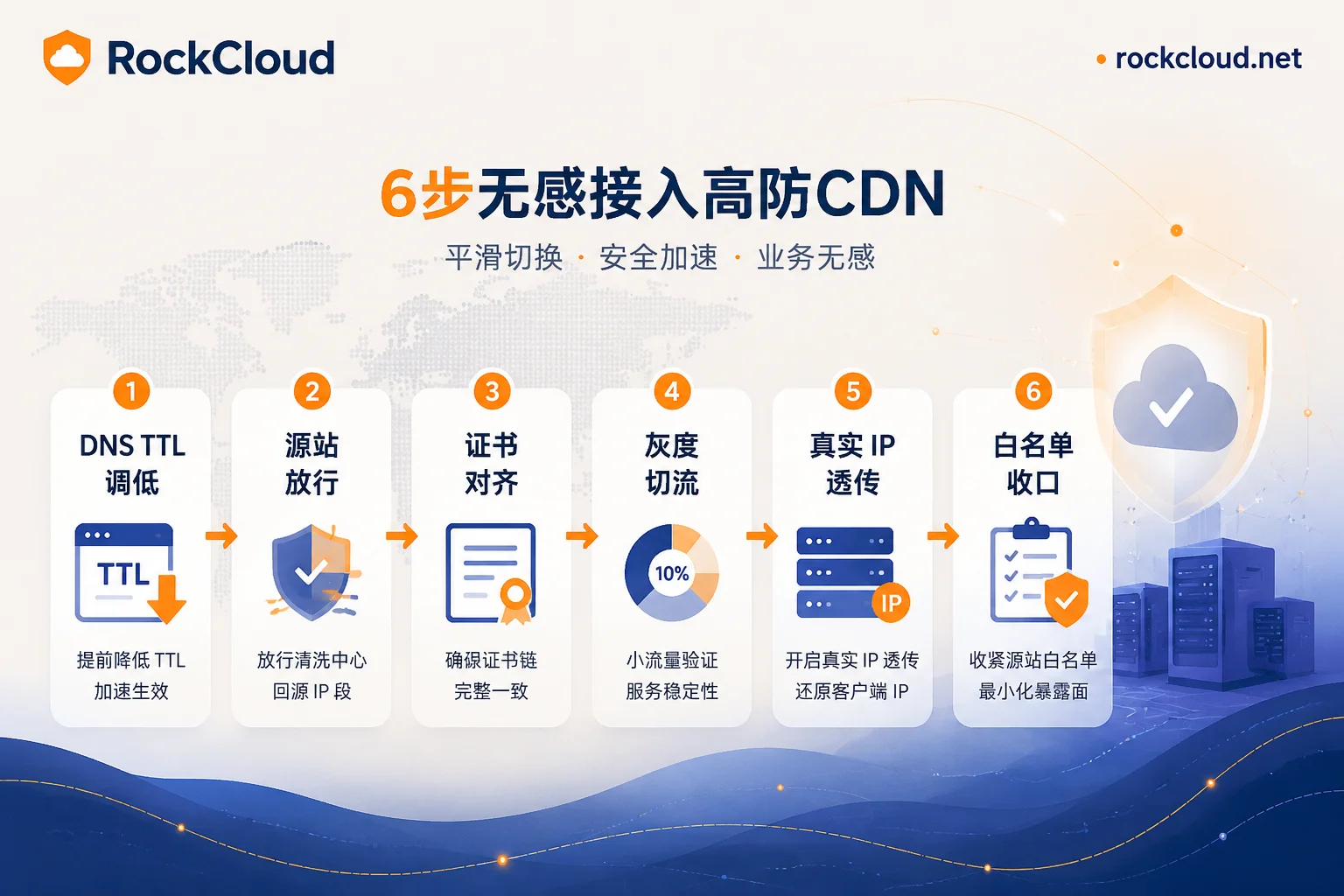
Let's state the conclusion upfront: the seamless high-defense CDN integration process can be executed in the following 6 steps, each with clear verification signals and failure rollback paths. The entire process can be gray-released and rolled back—there is no window that requires a forced outage:
- Inventory existing DNS records and non-HTTP port services before integration;
- Pre-allow origin IPs and calibrate origin HOST/SNI;
- Align certificates and origin protocols to prevent TLS handshake failures and redirect loops;
- Lower DNS TTL, shift traffic by 5%–10% weight for gray release, and observe metrics;
- Configure real IP passthrough to keep risk control and rate limiting effective;
- Fully lock down origin whitelist after stable operation to hide the origin.
You need to complete integration in advance because attackers won't wait for your traffic shift. The Cloudflare 2026 H1 report shows that in Q2 2026, attacks over 1Tbps surged 519% quarter-over-quarter, and 90.6% of network-layer attacks lasted less than 10 minutes, some only 35 seconds. Temporary traffic shifting is not enough.
Step 1: Inventory Resolution Records, Non-HTTP Ports, and Subdomains Before Integration
Before changing resolution, first clear your existing DNS assets to avoid missed cuts that could cause some traffic to go offline or leave the origin IP exposed.
You need to sort out three types of records:
- All A/AAAA/CNAME records: main domain, www, static resource subdomains, API subdomains, etc., listed one by one;
- Subdomains that need to go through CDN vs. not: for example, pure API services may not need CDN acceleration, but domains requiring high-defense protection must be included;
- Non-HTTP(S) port services: such as email SMTP, SSH, game TCP long connections, etc. These traffic do not go through CDN and need separate protection planning or direct connection. For differences in protection forms for TCP long-connection services, see High-Defense IP vs. High-Defense CDN.
It is recommended to create an asset table recording domain, record type, current resolution value, whether to use CDN, and remarks (e.g., business owner). This is the basis for subsequent gray traffic shifting. If you haven't chosen a provider yet, reference How to Choose a High-Defense CDN for selection criteria.
Step 2: Pre-Allow Origin IPs and Calibrate Origin Host to Avoid Immediate 502 After Switching
The most common failure after switching is 502 Bad Gateway or 504 Gateway Timeout, often rooted at the origin side, not the CDN. According to Alibaba Cloud official documentation (updated July 2026), there are two core root causes:
- The origin firewall or host security software mistakenly treats CDN's aggregated origin-return IPs as attacks, directly blocking or rate-limiting;
- The origin host does not match the origin's web virtual host (the domain bound in the site configuration), causing the origin to be unable to identify requests.
So, be sure to allow first, then switch:
- Obtain the origin-return IP ranges (or origin node IP list) from the CDN provider;
- Add these IPs to the whitelist in the origin firewall, security groups, and host security software (such as cloud lock, security dog);
- Configure the origin host in the CDN console to the domain actually bound to the origin;
- Use local hosts resolution or specify the origin domain to send test requests in advance to confirm the origin responds properly.
Verification method: modify the local hosts file, resolve the business domain to the CDN CNAME, then access the test page and observe the status code and response time. You can also use curl -H "Host: 业务域名" http://源站IP/ to directly verify whether the origin hits the correct site based on that Host. If 502 occurs, troubleshoot in this order: first check if the origin firewall is blocking, then check if the origin host is correct.
Step 3: Align Certificate Issuance and Origin Protocol to Avoid HTTPS Redirect Loops
After integrating the high-defense CDN, the HTTPS link is split into two segments: client to CDN, and CDN to origin. Both segments must confirm certificate and protocol consistency.
Common pitfalls: origin does not support HTTPS or lacks SNI extension causing TLS handshake failures; or origin port 80 forces a 301 redirect to 443, while CDN uses port 80 for origin requests, creating an infinite redirect loop. The correct approach is to align the origin protocol with the origin's actual capabilities: if the origin supports HTTPS, set the origin protocol to HTTPS and validate the origin certificate; if only HTTP is supported, set the origin protocol to HTTP and disable the forced redirect.
Verification checklist: use curl -I to test that CDN edge node access returns 200 rather than 301/302; use openssl s_client to check TLS handshake and SNI; and check the browser console for mixed content warnings.
Step 4: Lower TTL and Use Weighted DNS Resolution for Gray Release—What Metrics to Watch for High-Defense CDN Gray Switching
This is the riskiest step in the seamless high-defense CDN integration process. Only when DNS TTL is low enough can gray switching and rollback take effect within minutes.
Steps:
- 24-48 hours in advance, lower the TTL of existing A/AAAA records to 300 seconds or lower (some CDNs support TTL=60 seconds);
- Configure weighted resolution in the DNS provider, switching 5%~10% of resolution to the CDN CNAME;
- Observe monitoring data and origin logs to confirm no 5xx, TLS errors, or origin timeouts;
- Gradually increase the weight (e.g., 20%, 50%, 100%), observing for 10-20 minutes at each level to ensure metrics are stable before continuing.
Metrics to watch:
| Metric | Threshold | Description |
|---|---|---|
| 5xx ratio | No more than baseline +0.5% | 502/504 high-incidence stage |
| TLS handshake failure rate | 0 or near zero | Certificate or SNI issue |
| Origin response time P95 | Same as before switch | Whether origin load is abnormal |
| Cache hit ratio | Stable or rising | Acceleration effect for static resources |
The gray ratio and TTL values come from Alibaba Cloud official documentation (updated July 2026); the thresholds in the table are self-defined alert lines. Please calibrate based on your own monitoring baseline from the 7 days before switch.
If anomalies are found at this stage, handle them according to the "Rollback" section; the low TTL ensures quick recovery.
Step 5: Real IP Passthrough—Solve the Issue of Not Getting Real User IP After CDN Integration
After integrating CDN, the TCP connection source IP seen by the origin becomes the CDN edge node's IP, not the user's real IP. Without passthrough, backend risk control, rate limiting, and audit logs will all fail.
Taking Nginx as an example, configure the ngx_http_realip_module module:
set_real_ip_from <你的CDN回源IP网段>;  # 必须以服务商实际公布网段为准
real_ip_header X-Forwarded-For;
real_ip_recursive on;  # 开启后自上游链从右向左跳过已声明的可信地址,取到最后一个不可信地址,即真实客户端IP
Note: set_real_ip_from must be set to the CDN origin-return IP ranges; otherwise, anyone can forge the X-Forwarded-For header. After configuration, $remote_addr will become the client's real IP.
Next, adjust accordingly:
- Access log format (log real IP);
- Rate limiting modules (such as
limit_reqfor limiting based on real IP); - WAF or risk control systems (take values from X-Forwarded-For);
- Application code that directly reads
REMOTE_ADDRshould be changed to read the proxy header.
Verification method: check the origin logs to confirm that the IP segment is no longer the CDN origin-return IP but a spread of user IPs. If you worry about rate limiting failing in CC attack protection, you can reference Nginx Rate Limiting Best Practices for CC Attack Protection for hardening. Additionally, RockCloud WAF remains effective after real IP passthrough because WAF typically detects based on HTTP request headers; as long as the origin correctly passes X-Forwarded-For, WAF can continue to identify and block malicious requests.
Step 6: Lock Down Origin Whitelist After Full Switch to Complete Origin Hiding
After full switch and stable operation for a few days, you can perform the final step: origin whitelist lockdown. This step aims to prevent attackers from bypassing the CDN and directly attacking the origin IP.
Key points: in the origin firewall/security group, only allow CDN origin-return IPs and necessary management IPs to access business ports; also clean up historical resolution records and check for channels that leak origin IP, such as email headers, source code, and certificate transparency logs.
Important: lockdown must be done last. During gray release, if you lock down and an unexpected accident requires rollback, the origin being blocked by the firewall will make the business completely unavailable.
If you are unfamiliar with specific origin hiding methods, refer to How to Prevent Origin IP Exposure.
How to Roll Back After a Failed Switch: Rollback Order and Time Estimates
Even with full preparation, unexpected issues can occur. The key to rollback is low TTL, which determines how quickly you can recover.
Rollback order:
- Immediately switch the DNS weight back to the original resolution (if not fully switched, only restore the gray portion);
- If fully switched, modify DNS records to resolve the domain back to the origin IP (TTL lowered, takes effect quickly);
- Keep a low TTL window: after rollback, observe for a period to confirm recovery, then raise TTL as appropriate;
- If origin whitelist lockdown was involved, remove the whitelist restrictions first to ensure the origin does not block origin-return IPs.
Signals triggering rollback:
| Signal | Possible Cause |
|---|---|
| 5xx ratio spikes | Origin-return IP blocked, incorrect origin host, origin overload |
| Large number of TLS handshake failures | Certificate mismatch, SNI issue |
| Origin response time continues to time out | Origin firewall rate limiting, origin network anomaly |
Rollback speed is bounded by TTL; actually, judge by the traffic decline in both origin and CDN logs. This is the final safeguard in the seamless high-defense CDN integration process.
RockCloud's Role in Origin Convergence and Origin Protection
Throughout the process, RockCloud high-defense CDN primarily handles origin convergence, origin whitelist, and gray observation.
- Origin convergence: the origin inbound policy only needs to align with RockCloud high-defense CDN's origin-return sources, corresponding one-to-one with the whitelist actions in Step 2;
- Origin hiding: through CDN proxying, the origin IP is no longer directly exposed, combined with lockdown to further reduce the risk of bypass attacks;
- Gray observation: RockCloud log service can be used for status code and origin anomaly comparison during gray release.
FAQ
Will integrating a high-defense CDN cause website downtime?
If strictly following the above process, there will be no downtime. The key is to prepare the origin first, then gray shift traffic, and keep TTL low.
How long does CNAME high-defense CDN take to take effect?
Effectiveness depends on TTL and recursive DNS cache behavior. To judge effectiveness, check whether old resolution traffic in origin logs has dropped to zero.
Which DNS records need to be changed when integrating with a CDN?
Usually, you only need to change A/AAAA records to CNAME pointing to the CDN alias. No need to change NS or MX; keep original record backups for rollback.
How to configure HTTPS certificates after integrating high-defense CDN?
Configure two layers of certificates: client to CDN uses the CDN certificate, CDN to origin uses the origin certificate. Ensure certificates are valid, SNI is normal, and origin protocol matches the origin.
How to troubleshoot 502 errors after CDN integration?
Check sequentially: first, whether the origin firewall blocks origin-return IPs; second, whether the origin host is configured correctly; third, whether the origin is overloaded or timing out. Most cases are caused by the first two; after allowing, recovery is immediate.
How to do gray switching and rollback for high-defense CDN?
Gray switching is achieved through weighted DNS resolution; first shift 5%~10%, observe for anomalies, then increase. Rollback simply adjusts the weight or restores the original A record.
What to do if real user IP is not accessible after CDN integration?
In the origin Nginx, configure ngx_http_realip_module, set set_real_ip_from to the CDN origin-return ranges, and specify real_ip_header X-Forwarded-For. After configuration, restart Nginx.



Comments(0)