 RockCloud-基石云安全-官方博客
Yes, it will—but only if you're using crude rules like "User-Agent blacklists/whitelists only" or "global blanket rate limiting." Proper Bot Management doesn't kill all automated traffic with one blanket rule. Instead, it first identifies real crawlers through reverse-and-forward DNS closed-loop verification, official IP ranges, or cryptographic signatures, then separates SEO search crawlers, AI training crawlers, normal human visitors, and malicious scripts, applying allowlisting, rate limiting, frictionless verification, or edge blocking accordingly. This way, you protect core APIs and data assets without hurting organic search indexing or real users' purchase conversions.
Many site owners hesitate to enable anti-automation policies for the core concern that "while blocking crawlers, they'll also block Googlebot, Baiduspider, and even legitimate paying customers and payment callbacks." To solve this problem once and for all, you first need to understand how false positives and false negatives actually happen.
Why does enabling Bot Management often lead to false positives or false negatives?
The scale of automated traffic has long exceeded most ops teams' intuition. According to Imperva's 2026 Bad Bot Report, automated traffic accounts for 53% of all web traffic globally, human traffic has dropped to 47%, and 27% of bot attacks target APIs directly. Meanwhile, test data released by DataDome in September 2026 shows that malicious crawlers and automated scraping make up 70.9% of bad bot traffic (a 185.2% year-over-year surge), yet among 21,491 tested sites, over 70% let requests disguised as AI agents pass without any challenge.
On one side, you get overwhelmed without defenses; on the other side, "tighten up and things break." Common pitfalls cluster in three areas:
- Treating "same-IP concurrency" as "machine behavior": Mobile cellular networks (4G/5G), campus networks, or corporate office egress often share a single public IP among hundreds or thousands of real users. If you rely solely on per-IP frequency thresholds for blanket blocking, real users will hit errors en masse during peak hours. In-app WebViews, mini-programs, or third-party API calls lack a full desktop browser environment and are easily misjudged by static fingerprint rules. Even top cloud security vendors have caused large-scale false positives due to scoring logic failures—for example, in November 2025 Cloudflare zeroed out bot scores for all traffic due to a glitch, blocking legitimate requests, and in late April 2026 Akamai reported elevated false positive rates in Bot Manager that blocked legitimate traffic.
- Failing to distinguish SEO indexing crawlers from AI training crawlers: Many operators mistakenly believe that blocking AI crawlers will hurt search rankings, or conversely, block all crawlers uniformly in CDN/WAF rules. In reality, research by PlatformDTC in August 2026 points out that blocking model training crawlers like
GPTBotandClaudeBotdoes not affect Google search rankings; what actually impacts AI answer visibility is mistakenly blocking answer engine crawlers likeOAI-SearchBotandPerplexityBot. More insidiously, some brands in the sample directly returned 403 or 429 at the CDN rule layer to block recognized crawlers, causingrobots.txtaudits to show no anomalies whatsoever while indexing and visibility quietly declined. - Over-relying on
robots.txtand static User-Agent allowlisting:robots.txtis merely a protocol-level gentleman's agreement—malicious crawlers and many unauthorized AI scraping tools never request or honor it. Worse, if you simply whitelist User-Agents containingGooglebotorBaiduspiderto protect SEO, attackers only need to modify one line of the request header to scan your database at full speed under the search engine's "get-out-of-jail-free card."
How to separate good from bad traffic? Start with a four-category traffic comparison table
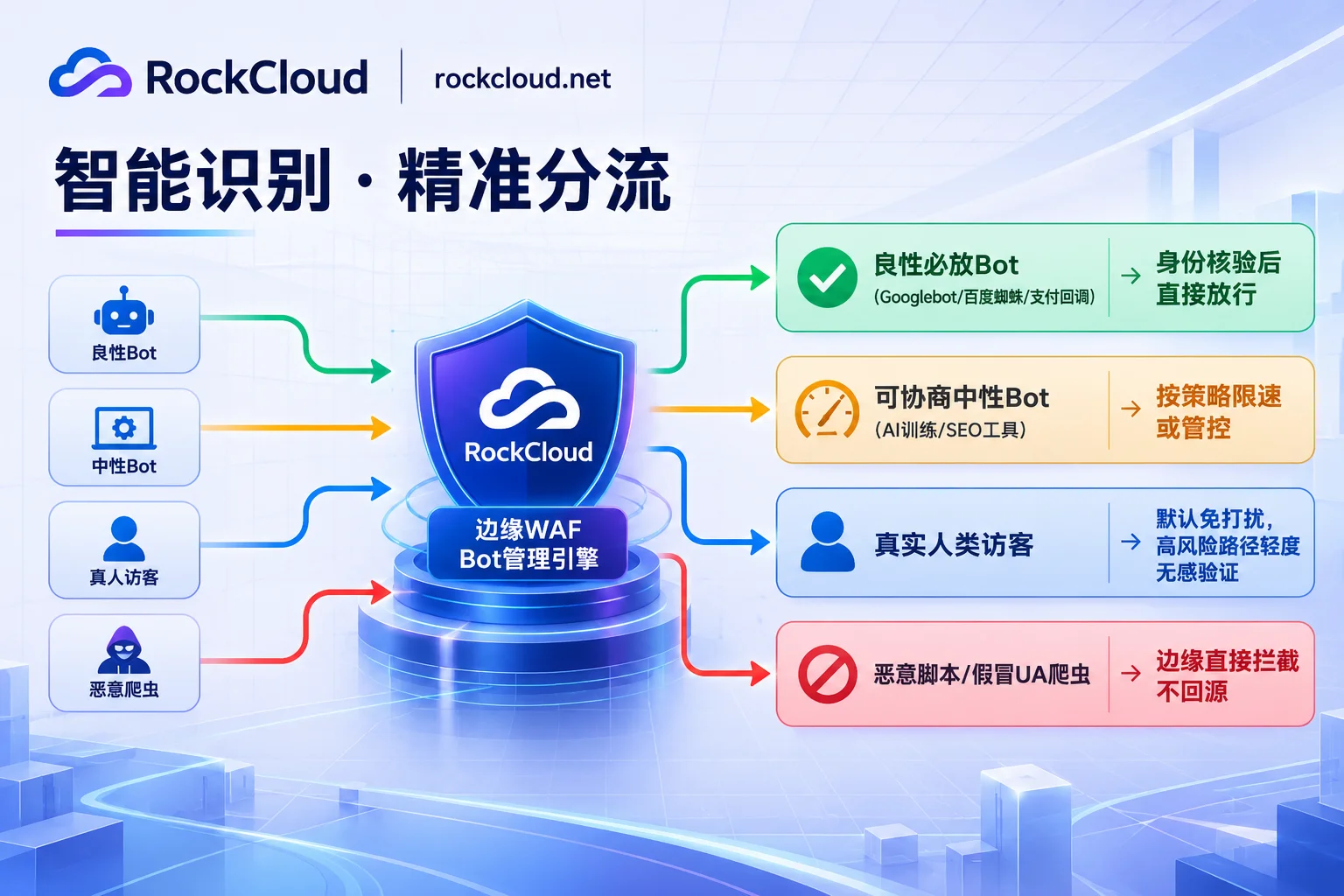
Before configuring any blocking rules, you must break the "human vs. evil" dichotomy and split traffic entering the edge node into four tiers for separate governance:
| Traffic Category | Typical Examples | Business Impact | Common Misjudgment and Spoofing Risks | Recommended Handling |
|---|---|---|---|---|
| Benign must-allow Bots | Googlebot, Baiduspider, Bingbot, uptime monitors, payment/webhook callbacks | Supports organic search rankings, AI search citations, and business async notifications | Malicious scripts love spoofing these UAs; callback endpoints lack browser characteristics and are easily misblocked | Verify true identity or allowlist by path, then allow directly |
| Negotiable neutral Bots | GPTBot, ClaudeBot, CCBot, third-party SEO tools, content aggregation scrapers | Consume origin bandwidth and compute but don't directly compromise account or transaction security | Blindly returning 403 at the edge may hurt partner channels; ignoring them drives up load | Allow + strict rate limit or reject based on business preference |
| Real human visitors | PC/mobile browser users, normal app/mini-program operators | Core revenue and conversion source | Shared NAT IPs, weak-network retries, privacy browser fingerprints easily trigger false positives | Default no-interference; only low-friction frictionless verification on high-risk paths |
| Malicious automated Bots | Credential stuffing, scalping/abuse, malicious price scraping, vulnerability scanners, fake-UA crawlers | Steal core data, cause account fraud, saturate origin CPU and bandwidth | Use residential proxy IP rotation, headless browsers simulating clicks, bypass front-end sliders | Block or silently drop directly at the edge node |
For more on the impact of massive fake AI Agents on bandwidth and billing bottom lines, you can also cross-reference our previous analysis How to Do Bot Management: When Automated Traffic Exceeds Half and Fake AI Agents Proliferate, How to Protect Core Data and Billing Bottom Lines?.
Zero false positives, zero false negatives: Four practical steps for Bot Management implementation
1. Never trust User-Agent—verify identity with "bidirectional DNS closed-loop + signatures"
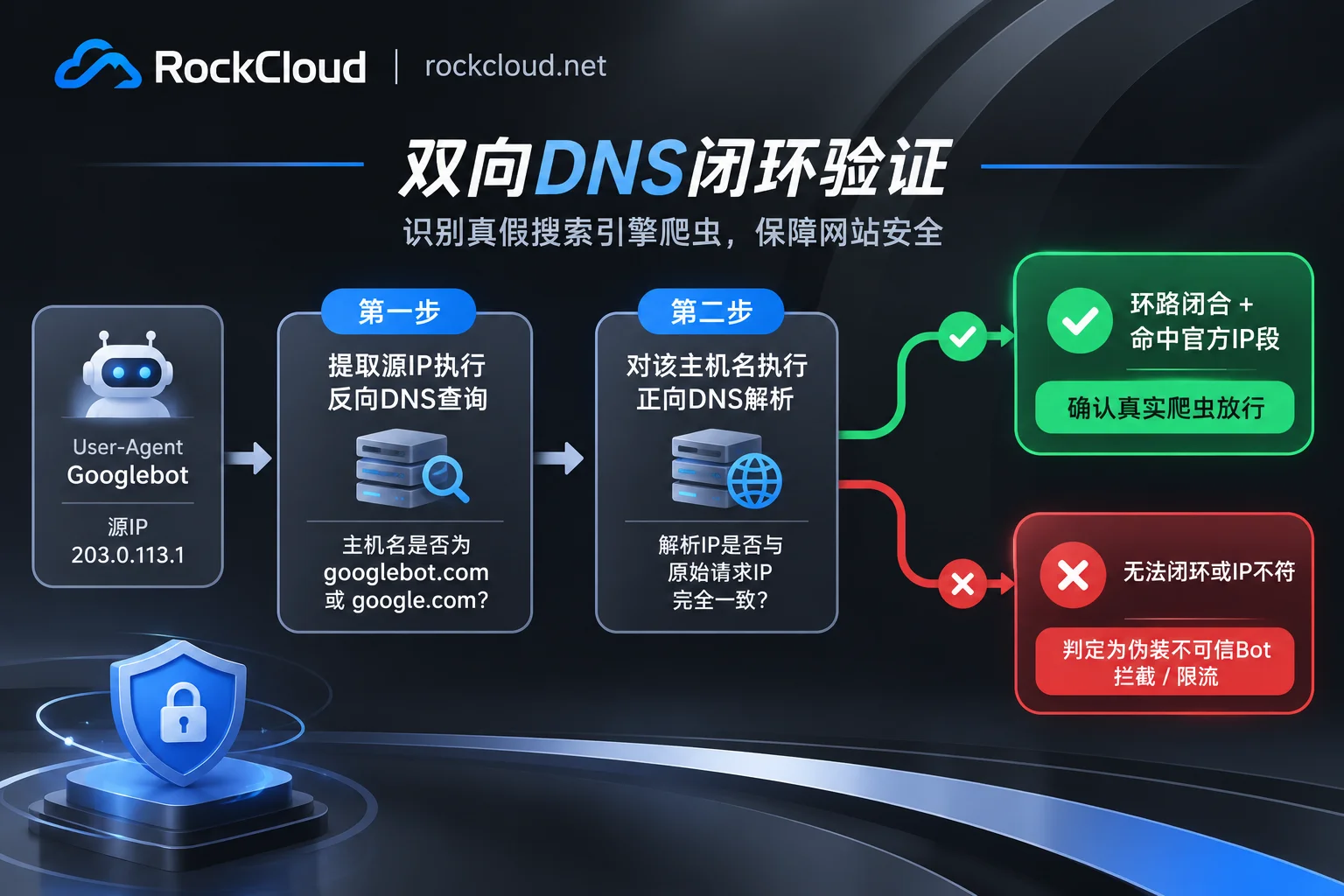
For mainstream search engine crawlers like Googlebot, the only reliable verification standard is checking whether the source address truly belongs to official infrastructure, not the string in the request header. According to Google's official crawler verification guidelines, proper automated and manual verification should follow a "reverse first, then forward" closed-loop process:
- Reverse DNS lookup: Perform reverse resolution on the source IP of a request claiming to be
Googlebot, confirming the returned hostname strictly belongs togooglebot.com(common crawler),google.com(special or user-triggered fetcher), orgoogleusercontent.com. - Forward DNS closure verification: Then perform a forward DNS lookup on the resolved hostname, confirming it points back to exactly the same IP address that originally made the request (i.e., Forward-confirmed reverse DNS, preventing forged PTR records).
- Automated comparison against official IP range JSON: For edge gateways or automated rule sets, you can directly integrate official continuously updated CIDR IP range files (such as Google's published
common-crawlers.jsonandspecial-crawlers.json) for precise full source IP matching.
For modern compliant AI agents that traditional IP lists struggle to cover, the industry has also accelerated adoption of Web Bot Auth between 2025 and 2026 (based on IETF HTTP message signing specifications, using Ed25519 and other public/private key pairs to sign legitimate bot and AI Agent requests), replacing fragile IP guesswork and CAPTCHA interruptions with cryptographic credentials. Whether using bidirectional DNS or cryptographic signatures, the core principle is: requests that fail authenticity verification but carry a search engine UA should be treated as high-risk untrusted scripts with strict handling.
2. Separate protection for "content browsing pages" and "high-risk business APIs"
False positives often stem from using one set of global parameters to manage the entire site. SEO indexing cares about the crawlability of article pages, product detail pages, and sitemaps; while the real high-frequency attacks from malicious scripts target login authentication, SMS verification codes, coupon claiming, payment checkout, and public query APIs.
Therefore, policies must be layered by URI path and request method:
- Content and static pages: Fully allow verified benign crawlers; for unverified high-frequency scraping, apply only path-level graduated rate limiting to avoid affecting search engine crawl depth.
- Login, registration, and transaction APIs: Tighten allowed client fingerprints and request sequences, combining behavioral characteristics and dynamic anomaly detection to block credential stuffing and API abuse. For specific API-layer traffic control tactics, see How to Do Bot Management: When AI Crawlers and Automated Scripts Flood Login and Payment APIs, How to Use Edge WAF for Fine-Grained Traffic Control.
3. "Observe" first, then "tiered handling"—use high-friction CAPTCHAs cautiously
Never enable global blocking on day one of new rules. The mature approach is to first run new policies in observe (observation log/alert) mode for a period, checking whether the hit list contains legitimate customer IPs, partner APIs, or official crawlers, and only switching to enforcement after confirming zero false positives.
Meanwhile, the 2026 attack-defense reality is that both human CAPTCHA-solving platforms and AI recognition tools have dramatically lowered the cost of bypassing traditional image CAPTCHAs. Blindly popping sliders and puzzles at users only blocks real people rushing to check out. A more reliable handling ladder is: allow low-risk → lightly rate-limit or silently JS-fingerprint suspicious → directly block confirmed malicious scripts, strictly limiting visible verification to the very few high-risk login or coupon-claiming requests.
4. Create separate exception allowlists for payment callbacks, webhooks, and app clients
Async callbacks from payment platforms, third-party logistics notifications, internal monitoring probes, and app API calls naturally "don't look like human browsers" in network characteristics. If you don't establish exception allowlist rules upfront based on "exact path + source IP allowlist / signature verification," enabling WAF and anti-automation protection can easily cause dropped orders. If you've already encountered similar callback anomalies, you can follow How to Add a Whitelist When WAF Blocks Payment Callbacks: Check the Rule ID First, Then Allow IPs Precisely by Path to complete fine-grained allowlisting.
Suspect false positives already happened? 4 quick troubleshooting steps to stop the bleeding
If the business side reports pages not loading, conversion dropping sharply, or indexing fluctuations, follow this order to pinpoint whether it's a rule misjudgment within minutes:
- Pull edge block logs: Filter CDN/WAF logs for status codes
403,429, or challenged requests, focusing on the hit rule ID, request path, and the ASN of the source IP. - Compare with search console crawl anomalies: Open Google Search Console and other webmaster tools to check whether crawl stats suddenly show widespread connection timeouts or 4xx/5xx rejections, distinguishing origin failures from edge blocking (if involving no-ICP-filing nodes and indexing fluctuation troubleshooting, you can read further Will Using a No-ICP-Filing CDN Affect Baidu and Google Indexing? A Troubleshooting Guide for Indexing Drops and Crawl Anomalies).
- Check if you've been overwhelmed by "fake crawler bypasses": Sometimes pages slowing down isn't false positives but a flood of fake Googlebot crawlers bypassing rules, or even scanning historically exposed origin IPs for direct scraping. In this case, lock down the origin firewall to only allow edge back-to-origin node IPs.
- Temporarily switch back to observe mode and extract features for allowlisting: Once you confirm legitimate traffic hits a rule, immediately set that path or verified characteristics as an exception, restore business, and then add fine-grained rules for remaining malicious characteristics.
Implement a "zero false positives, no extra charges" edge defense with RockCloud
Maintaining bidirectional DNS verification, TLS fingerprints, and constantly morphing script signatures on your origin Nginx or a single open-source component consumes significant R&D effort, and when facing concurrent site scanning or mixed L7 CC attacks, your origin itself will be exhausted first.
Deploying Bot Management capabilities at the edge can block the vast majority of malicious automated traffic before it reaches your origin:
- One-click intelligent WEB firewall (WAF): Enable WAF with one click in the RockCloud control panel, with built-in OWASP core rule sets (covering scanner and bot identification, SQL injection, XSS, command injection, etc.), while using machine learning models to identify new malicious automated requests not yet in the rule library.
- Security team assists in tuning custom rules and exception allowlisting: No need for ops to fumble alone with obscure regex and thresholds. Custom rules and exception allowlists involving search engine crawler verification, payment callbacks, partner webhooks, or specific app APIs are all configured with assistance from the RockCloud security technical team, reducing false positive risk at the source.
- Integrated attack and defense with no per-request billing: RockCloud integrates Anycast high-defense CDN, DDoS/CC protection, and WAF into a single request chain and a single monthly plan. Onboarding is smooth via CNAME without changing your DNS provider; plans are billed by fixed peak bandwidth with unlimited traffic and requests, and defense and WAF are all included—unlike some cloud solutions that charge per tens of millions of requests and find themselves in a "damned if you do, damned if you don't" cost dilemma when crawler traffic suddenly surges.
- Real-time logs and Telegram push notifications—test before going live: The console provides complete traffic bandwidth reports and network logs and supports binding Telegram for real-time push of anomaly data, so you can sense any blocking fluctuations immediately. Before the official switch, you can also contact customer service to determine specifications and apply for a free trial, verify SEO crawling and core business fully normal during the trial, then roll out to full scale. If you're currently facing origin alerts caused by malicious crawlers or attacks, you can also quickly get emergency access through the Security Response Contact Page or the official Telegram channel.
Quick answers to common questions
After enabling Bot Management, should I still put a robots.txt in the website root directory?
Yes, but you must position it correctly. robots.txt tells rule-abiding search engine crawlers and compliant AI tools which directories are not recommended for indexing, avoiding wasted crawl budget. What actually blocks protocol-ignoring malicious scraping and script attacks must rely on edge WAF and behavioral identification rules.
I only want to block model training crawlers without losing brand citations in AI search answers—can that be done?
Yes. The key is that rule granularity must not be written as "block everything containing Bot/AI," but instead split handling by specific agent identifiers and authenticity verification—for example, rate-limiting or rejecting training crawlers like GPTBot and ClaudeBot, while allowing search and answer engine crawlers like Googlebot, Baiduspider, OAI-SearchBot, and PerplexityBot after identity verification.
My origin is already hidden behind a CDN, so why can crawlers still max out server CPU?
There are usually two possibilities: first, crawlers spoofed User-Agents or request characteristics you've globally allowlisted, passing through the CDN and continuously hitting uncached dynamic query endpoints; second, your origin's real IP was previously leaked through historical DNS records, email headers, or test subdomains, and crawlers are bypassing the CDN to access the origin directly. The solution is to tighten "edge back-to-origin verification + origin only allows back-to-origin node IPs," and simultaneously review WAF and rate-limiting rules for dynamic endpoints.