 RockCloud-基石云安全-官方博客
Let's give the conclusion directly: WAF protection is extremely useful and is almost a necessity for websites, APP backends, and API interfaces exposed to the public internet; but it is not a universal shield that lets you sit back and relax once enabled.
Three sentences to help you quickly grasp the current situation:
- What it can block: WAF (Web Application Firewall) operates at the application layer (Layer 7) and specializes in identifying and blocking attacks targeting HTTP/HTTPS request content, such as SQL injection, XSS cross-site scripting, command injection, file inclusion, malicious vulnerability scanning, and application-layer CC attacks that mimic normal access.
- What it cannot block: Business logic vulnerabilities in the code itself (e.g., unlimited coupon stacking, unauthorized viewing of others' orders), large-scale DDoS floods that saturate outbound bandwidth, intrusions on non-web ports like SSH, and traffic where attackers bypass the WAF and directly hit the origin server's real IP—WAF alone cannot stop these.
- Is the free version enough? Personal showcase sites or test environments can use open-source/free WAF as a fallback; but as long as your business involves login, payment, dynamic APIs, or you already face malicious scanning, CC floods, and cross-region access speed requirements, installing WAF on the origin server itself consumes performance and cannot withstand large traffic—an integrated cloud WAF solution deployed at the CDN edge is more suitable.
Below, we will thoroughly dissect the core issues most prone to pitfalls when searching for "WAF protection."
I. What does WAF protection actually block, and what can't it block?
Many people easily confuse WAF with traditional network firewalls. A simple distinction: a traditional firewall is like a building access control—it only looks at "which IP you come from and which port you use," and as long as you access a legitimate port 80 or 443, it lets you through; whereas a WAF is like a security inspector—it specifically unpacks the headers, URL parameters, cookies, and request body of every HTTP/HTTPS request to determine "whether the content you submit after connecting is a malicious payload."
This is why a server with security groups enabled and a regular firewall installed can still be breached or defaced—because the attack traffic goes through normal web ports.
| Threat Type | Can WAF Block? | Reason and Boundary Explanation |
|---|---|---|
| SQL Injection / XSS / Command Injection | Yes | Has clear payload signatures or syntax semantics; can be intercepted at the entrance via rule matching and parsing engines |
| File Inclusion / Path Traversal / Known Component Vulnerability Scanning | Yes | Can directly block automated probing based on OWASP Core Rule Set and anomalous scanning signatures |
| High-frequency crawlers and HTTP-layer CC attacks | Yes (depending on architecture) | Edge cloud WAF can combine rate control, behavior, and bot identification for scrubbing; on-premises WAF will first overwhelm the origin under extremely high concurrency |
| Business logic vulnerabilities (e.g., $0 orders, API privilege escalation) | No | Request format and parameters are completely legitimate; it is a code logic flaw that must be fixed by developers in the source code |
| Large-scale L3/L4 DDoS attacks (e.g., UDP/SYN floods) | No | Traffic clogs server bandwidth before entering HTTP parsing; requires front-end scrubbing |
| Bypassing WAF to directly connect to origin IP / non-web port attacks | No | Traffic does not pass through the WAF node at all, so WAF cannot detect it; SSH brute force requires host security policies |
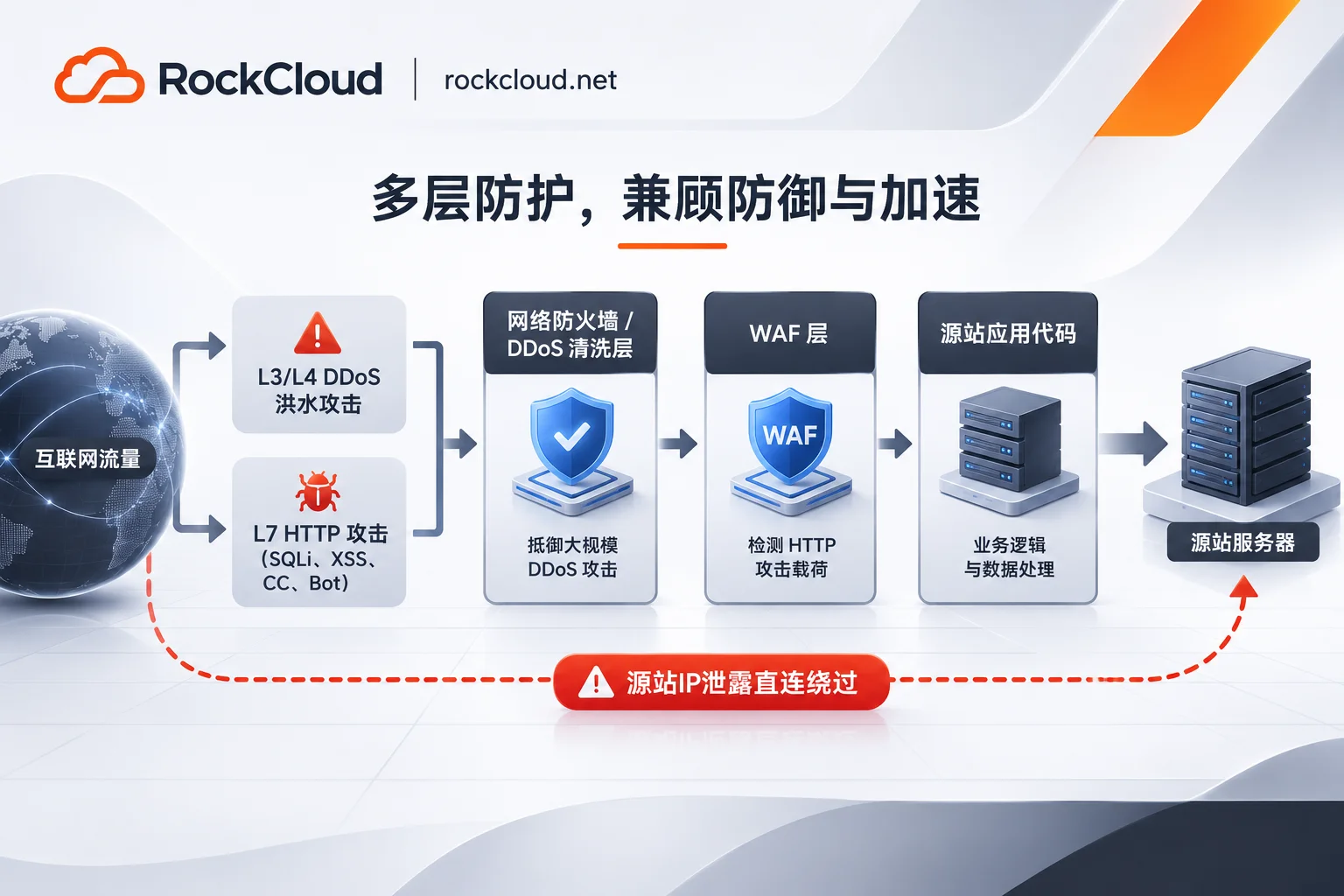
As seen in the diagram above, web security is not a single-point defense. WAF is responsible for securing application-layer content, but the premise is that all HTTP/HTTPS traffic must "honestly pass through the WAF front," and the underlying network bandwidth must not be overwhelmed by large traffic.
II. Is free or open-source WAF protection enough? How does it differ from cloud WAF?
Many operations engineers and individual site owners searching for "WAF protection" compare open-source/free solutions (e.g., ModSecurity, Coraza, community-built WAF, or free trial versions from some cloud providers) with paid cloud WAF. First, an objective judgment: open-source WAF is not weak in technical capability, but the bottleneck often lies in "deployment location" and "maintenance cost."
Self-built free WAF typically faces four practical thresholds:
- Consumes origin performance and cannot withstand traffic-based overwhelm
Installing WAF on the business server itself (or a single front-end reverse proxy) means every concurrent request requires regex or semantic parsing locally, significantly increasing CPU and memory usage under high concurrency. More critically, once an adversary simultaneously launches high-frequency CC or mixed DDoS attacks, traffic still hits your server's network card directly, and the server runs out of resources and goes down first—rendering the on-premises WAF meaningless. - High false positive rate of generic rules, and 0day updates rely on manual work
Open-source rule sets (like OWASP CRS) have broad coverage but are not friendly to common domestic business parameter formats, rich text editor submissions, and complex JSON APIs. After going live, normal APIs are often blocked, and operations staff must troubleshoot and modify rules one by one; against newly exposed 0day variant attacks, self-built solutions often lack continuous rule and model iteration. - Free cloud WAF often has hidden boundaries
Many public cloud free versions have short trial periods or strict QPS limits; some do not open CC custom rules, fine-grained bot management, or long-term log auditing. When real attacks occur, they may be downgraded due to exceeding limits or generate high pay-as-you-go bills. - Lack of synergy with scrubbing and acceleration
If you separately purchase standalone WAF, regular CDN, and scrubbing IP, not only is the serial configuration complex, but an extra layer of forwarding also adds access latency, and when failures occur, it is difficult to determine which link is stuck.
Therefore, if your business is only a low-concurrency test site or internal system, you can start with an open-source solution combined with code auditing; if it is a revenue-generating website, APP API, payment, or AI service facing the public internet, choosing a cloud WAF deployed at edge nodes with built-in traffic scrubbing will save much worry. For further trade-offs between hardware devices and cloud solutions, you can also refer to How to choose between cloud WAF and hardware WAF.
III. Will enabling WAF protection slow down the website or block normal users?
These are the two most common concerns of technical leaders. The answer depends on where the WAF runs and how the rules are tuned.
1. Regarding access speed: edge fronting is usually faster than "direct origin connection"
If WAF is deployed on the origin server itself, it does consume some response time. But if WAF runs on CDN edge nodes with caching and transmission optimization capabilities:
- Static resources are returned directly from edge cache hits without going back to the origin;
- Dynamic requests complete millisecond-level inspection at the node closest to the user, then return to the origin via optimized backbone links;
- Combined with modern transport protocols like HTTP/3, TLS 1.3 0-RTT, and Brotli compression, overall loading speed is often faster than users directly connecting to the origin.
2. Regarding false positives: do not disable rules across the board
After going live with WAF, the biggest fear is "blocking normal orders, payment callbacks, or backend edit saves." The correct approach is not to disable WAF out of fear of false positives, but to:
- First check the blocking logs to locate the specific triggered rule ID and request path;
- Only make precise exceptions for specific paths (e.g., third-party payment callback URLs) or trusted callback IP ranges, rather than enabling a global whitelist for the entire domain. For specific operation logic, refer to How to whitelist when WAF blocks payment callbacks;
- For more complex chunked transfer bypasses, 0day payload variants, and high false positive tuning architectures, you can further read How to implement WAF protection: practical architecture against chunked padding bypass, 0day variants, and high false positive pain points.
IV. A worry-free solution: put WAF, CC/DDoS defense, and CDN in the same link
In actual operations, splitting WAF, CC defense, DDoS scrubbing, and CDN across multiple vendors often leads to a triple dilemma: "high added latency, fault blame-shifting, and out-of-control traffic bills" (for billing and selection differences among these, see Do you need to buy CC defense separately? Differences from DDoS scrubbing and WAF, and a guide to avoiding pitfalls).
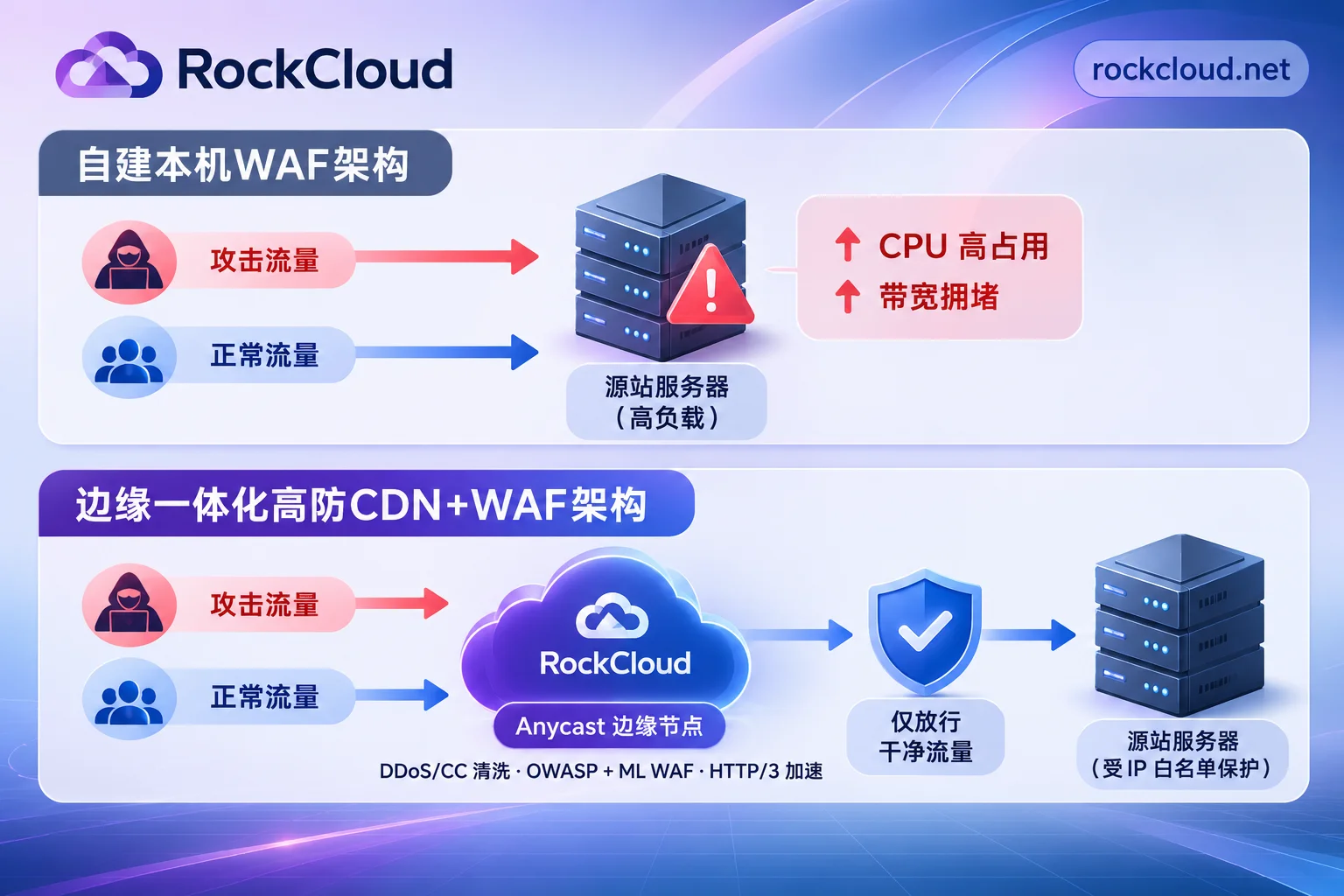
If your business (website, APP, WEB API, AI service, payment, or cross-border business) does not want to purchase hardware or deal with complex open-source compilation and rule tuning at the origin, you can directly adopt RockCloud's integrated edge security acceleration architecture:
- Integrated protection in the same link, no need to buy WAF separately: RockCloud's intelligent WAF protection is built directly into the scrubbing CDN edge nodes. The customer's existing server or cloud host continues to serve as the origin (no need to buy a separate scrubbing server). DDoS scrubbing, CC defense, WAF, and free fully automated SSL are all completed in the same request path and the same package—defense requires no separate purchase.
- Dual-engine detection + technical team assistance in tuning rules: The control panel supports one-click WAF activation. The underlying layer simultaneously enables the OWASP Core Rule Set (blocking SQL injection, XSS, file inclusion, command injection, malicious scripts, scanners, bots, etc.) and a machine learning identification engine (capturing new malicious requests not yet in the rule base). Custom rules or exceptions for special business APIs are configured with the assistance of the security technical team, greatly reducing the risk of business false positives.
- Fixed peak billing, no fear of malicious traffic generating sky-high bills: Packages are billed monthly by default at a fixed peak, with unlimited traffic and requests. Malicious scanning or sudden request spikes will not generate uncontrollable pay-as-you-go overage charges (for specific defense specifications, node performance, and trial duration, refer to the official RockCloud billing and packages page).
- Zero-downtime access without changing NS, balancing global and China-return acceleration: Simply add a CNAME record at your original DNS provider to access; during the switch, old and new links run in parallel without affecting online business. Leveraging Anycast proximity access and the global acceleration network (supporting HTTP/3, TLS 1.3 0-RTT, Brotli compression), businesses targeting mainland China users can also optionally add the three-network direct CN2 China acceleration dedicated line (Telecom CN2 GIA, Unicom AS9929, Mobile CMI, ICP filing exempt).
V. A 4-step checklist before and after enabling WAF protection
Regardless of which WAF solution you ultimately choose, completing the following 4 steps will prevent "WAF enabled but still breached or affecting business":
- First check for historical traces and existing backdoors: Before connecting, check whether the server has been implanted with a Webshell, and whether management ports like SSH and databases use strong passwords and restrict access sources; if the business is currently under attack, be sure to change the origin IP synchronously when connecting to scrubbing and WAF, so as not to leave attackers an entry point via the old IP.
- Only allow back-to-origin nodes on the origin (the most critical step): Configure a whitelist in the origin server's security group or local firewall to allow only CDN/WAF node back-to-origin IPs to access business ports like 80/443, completely blocking the channel for attackers to bypass WAF and directly connect to the origin (for detailed troubleshooting paths, see Will the origin IP still be exposed after connecting to scrubbing CDN).
- Confirm the origin can read the visitor's real IP: After connecting to a proxy-layer WAF, the connection IP seen by the origin becomes the back-to-origin node IP. You need to configure reading forwarding headers such as
X-Forwarded-Forin Nginx/Apache or business code to prevent the business's own rate limiting or risk control system from mistakenly blocking the back-to-origin node as an abnormal single IP. - Verify core API pass-through and blocking effectiveness: After going live, prioritize testing key links such as login, registration, file upload, and payment callback to ensure they work normally, and use the control panel's network logs to check for false blocks; then use harmless test signatures to verify that injection and scanning blocking are effective.
If you are unsure which defense specification suits your current business, or if your business is under attack and urgently needs to go live with protection, you can directly visit the RockCloud contact page or contact the security response and customer service team via Telegram to discuss specifications and apply for a free trial to test the actual effect.