 RockCloud-基石云安全-官方博客
Choosing a Hong Kong CN2 server, the real question is not "which is cheaper" but two independent matters: "is the return path truly CN2" and "who carries the traffic when attacked." The Cloudflare 2026 H1 threat report shows that DDoS attacks over 1 Tbps surged 519% quarter-over-quarter, with most peak attacks compressed within 5 minutes. This means today's Hong Kong CN2 server selection cannot focus solely on bandwidth; you must verify "line quality" and "DDoS mitigation" separately. Below, we break down the six criteria to check before signing, each with verification actions you can perform yourself.
What is the difference between Hong Kong CN2 and ordinary Hong Kong servers
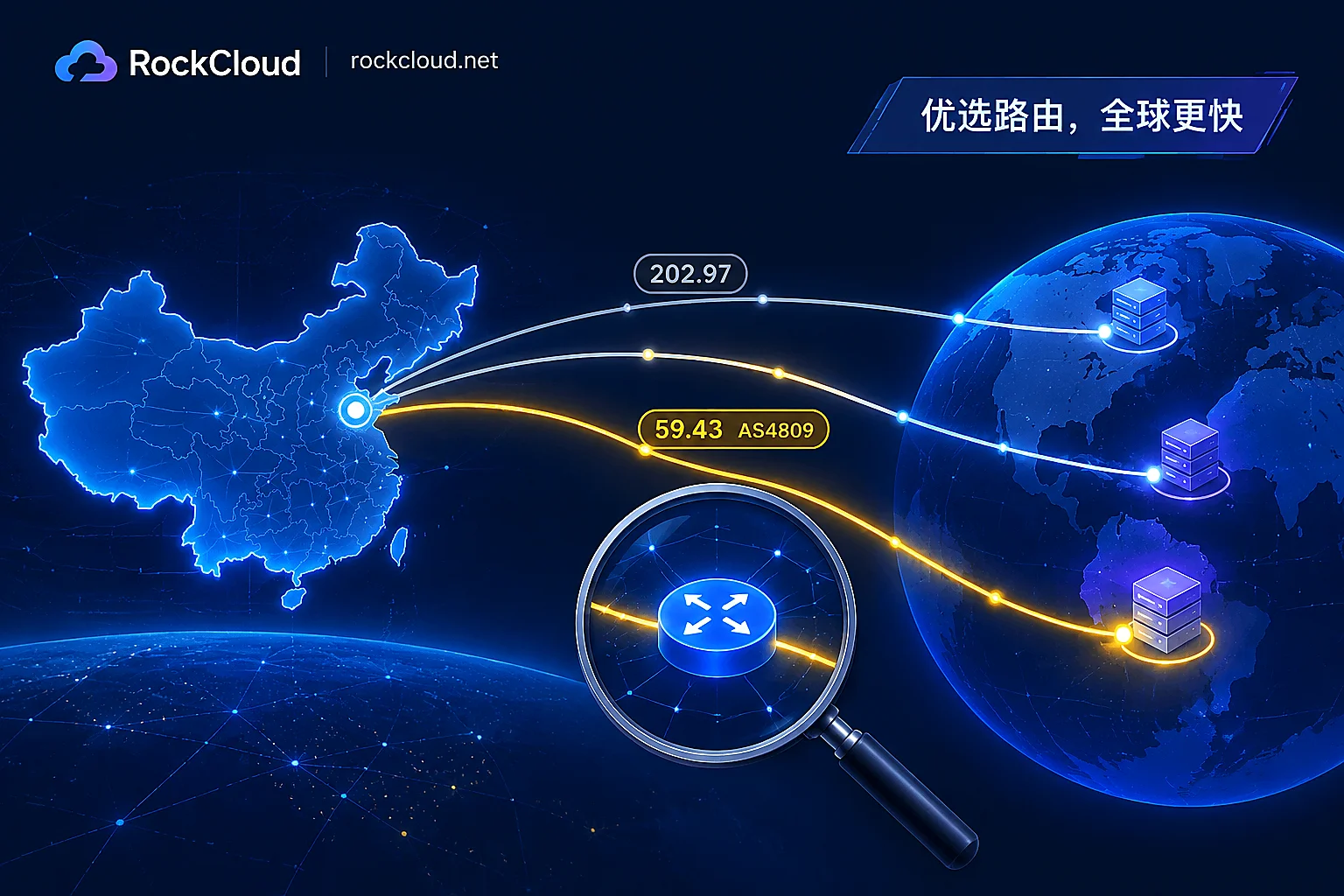
The core difference between Hong Kong CN2 servers and ordinary Hong Kong servers is not bandwidth but the transmission path. CN2 (AS4809) is China Telecom's high-priority, lightly loaded network, with return traffic going through 59.43.. nodes, like a "fast lane." Ordinary Hong Kong servers typically use the 163 backbone (AS4134, nodes 202.97..) or BGP mixed routes, prone to congestion during peak hours. However, note that CN2 is a transmission path, not a scrubbing center—it does not filter DDoS traffic. Many salespeople conflate "CN2 dedicated line" with "high-defense server," a dangerous confusion to watch out for during procurement.
Criterion 1: Is the return path truly CN2—use mtr to distinguish GIA from GT
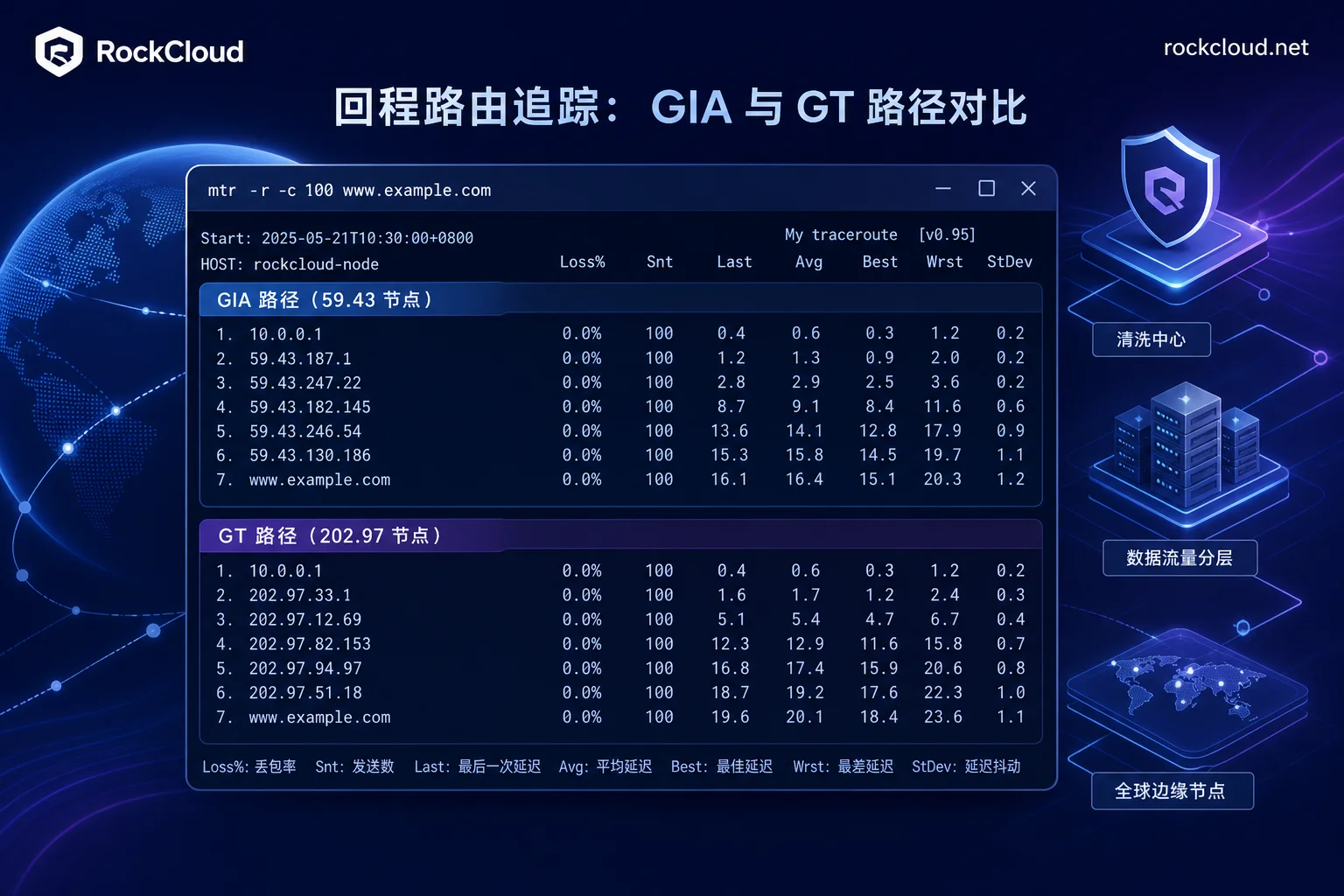
To verify whether a Hong Kong CN2 server's return path is truly CN2: from the mainland side, run mtr or traceroute to the server IP and observe if the return route contains 59.43.. AS4809 hops. If the entire route uses 59.43.. and does not fall back to 202.97.. (163 backbone) on the domestic segment, it's basically CN2 GIA (Global Internet Access); if there are 202.97.. hops in the domestic segment, it's CN2 GT (Transit).
What to verify: Full return path, especially whether the domestic segment falls back.
How to self-test: Use mtr -r -c 100 [server IP], record AS numbers and latency for each hop.
Failure signal: If the return path shows many 202.97.. hops with no 59.43.., it's not true CN2, or only CN2 GT.
Criterion 2: How to test peak-hour packet loss and jitter
Severe packet loss on Hong Kong servers during peak hours is often related to congestion segments and line grade. CN2, as a high-priority, lightly loaded network, should theoretically have less queuing degradation during congestion than ordinary international egress, but actual performance depends on the data center's egress bandwidth and concurrent user structure, so self-test results are definitive.
What to verify: Packet loss rate and jitter distribution during peak hours, compared with daytime baseline.
How to self-test: At 19:00, 21:00, and 23:00, run 5-minute mtr tests from multiple mainland locations (Telecom, Unicom, Mobile), record the hop where packet loss occurs and jitter values, and compare with the same path during daytime.
Failure signal: Packet loss consistently concentrated at a specific 202.97.. hop, and peak-hour loss significantly higher than daytime baseline, with long-tail jitter distribution, indicates congestion on that segment. During the trial period, run a full cycle, not just daytime tests.
Criterion 3: Does enabling L4 protection increase RTT?
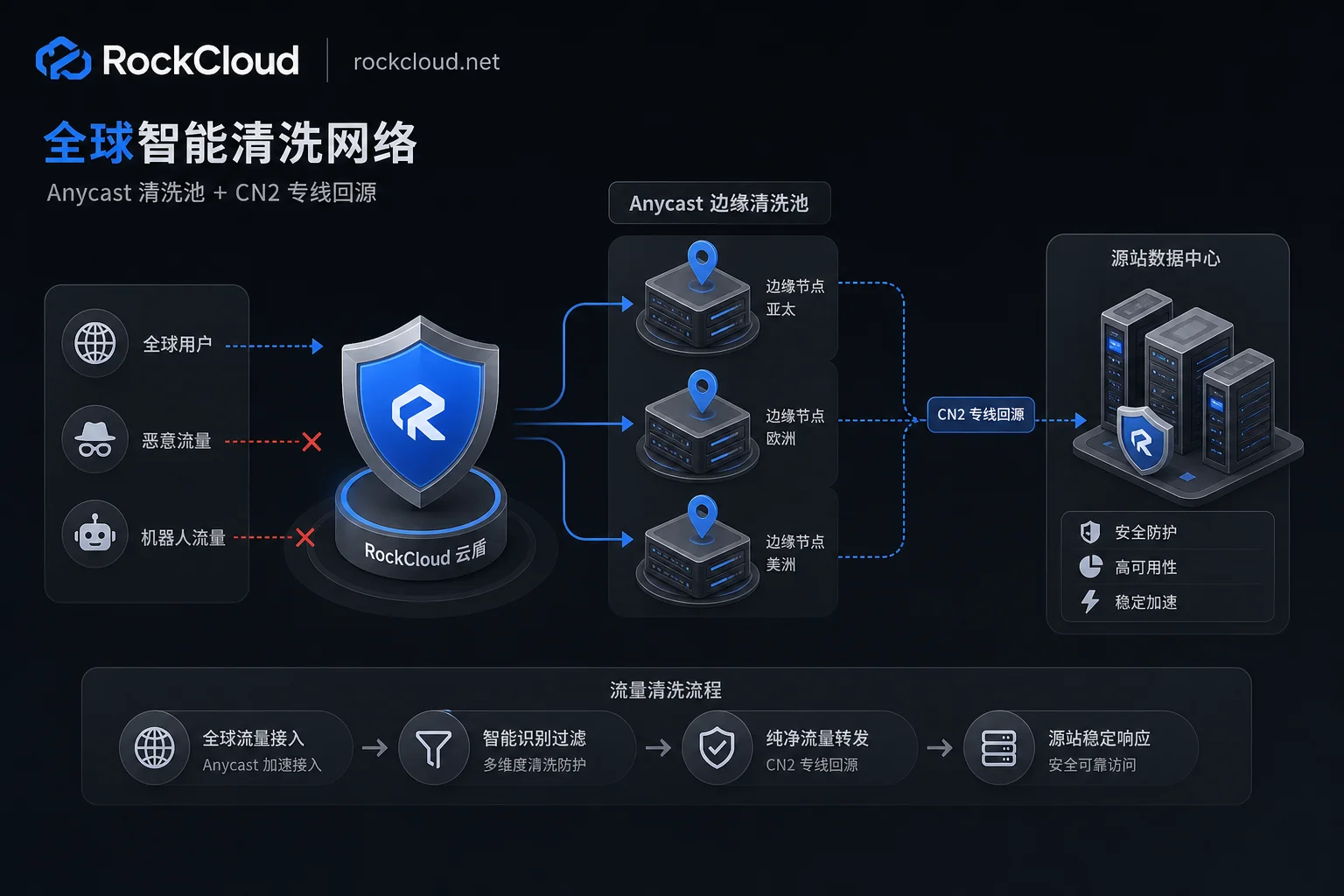
Many Hong Kong CN2 servers come with L4 protection, but enabling it may divert traffic to scrubbing devices, significantly increasing RTT. Scrubbing architectures fall into two types: diversion scrubbing and always-on edge scrubbing. Diversion scrubbing reroutes traffic to a scrubbing pool during attacks, then re-injects it, adding path length and RTT; always-on edge scrubbing routes traffic through edge nodes continuously, offering more stable paths, but you must confirm whether the scrubbing pool is shared or dedicated.
What to verify: RTT changes before and after enabling protection, and isolation of the scrubbing pool.
How to self-test: Use RTT with protection off as baseline, then measure RTT and packet loss continuously with protection on, checking for sustained elevation.
Failure signal: Perceptible sustained RTT increase (not occasional spikes) after enabling protection indicates high cost from scrubbing path detour; demand written explanation of diversion path from the provider; or provider cannot explain in writing whether the scrubbing pool is shared. Shared scrubbing pools can be impacted by neighbors' attacks, so insist on written answers. For principles of scrubbing node distribution and diversion paths, refer to BGP Anycast技术在DDoS清洗中的应用.
Criterion 4: Disposal authority when attacked—blackhole threshold and unblock duration
Will a Hong Kong server be blackholed during a DDoS attack? The answer: if not equipped with high-defense, probably yes. Public cloud and Hong Kong IDCs implement blackhole strategy (RTBH) for ordinary cloud hosts/dedicated servers without scrubbing: when inbound traffic exceeds basic protection thresholds, all external traffic is blocked. Alibaba Cloud blackhole policy documentation shows that mainstream cloud providers default blackhole duration is 30 minutes to 2.5 hours, with automatic extension if attacks persist or recur.
What to verify: Blackhole threshold, unblock duration, and whether early unblock can be requested.
How to self-test: Require the provider to specify the blackhole trigger threshold, default block duration, and how long until automatic unblock after an attack ends.
Failure signal: Provider vague about unblock duration, or promises "unconditional instant unblock"—basically impossible, as carrier-level blackholes require at least minutes to unblock. For handling procedures after an attack, refer to DDoS应急响应.
Criterion 5: How is the cross-border return link designed?
If your origin is in mainland China, the Hong Kong CN2 server typically acts as an entry acceleration node, quickly connecting access traffic to CN2 for return to origin; if the origin is overseas, the Hong Kong node acts as a relay for return traffic. These two scenarios have different requirements:
| Origin Location | Hong Kong Node Role | Return Link Requirements | Key Risks |
|---|---|---|---|
| Mainland | Entry acceleration | CN2 dedicated line direct to mainland | Low origin exposure risk, but return bandwidth must suffice |
| Overseas | Relay return | Dedicated line or premium international bandwidth | Return IP must be concealed, otherwise origin exposed |
What to verify: Return link design, whether return IP is concealed, and whether origin can be directly discovered by attackers.
How to self-test: Ask provider for return link topology, and test RTT and packet loss on the return path.
Failure signal: Return traffic over public internet, no IP concealment, or origin IP easily detectable.
Criterion 6: Can UDP and proprietary protocols be supported for gaming?
If you run gaming or real-time interactive services, UDP and custom protocols are the norm. Many "high-defense" solutions only work for HTTP/HTTPS and are helpless against UDP floods and mixed-protocol attacks. Radware 2026 report shows network-layer attacks grew 168.2% year-over-year, with DNS floods, CLDAP reflection becoming dominant vectors, and attack durations compressed to under 5 minutes—short bursts demand extremely high scheduling capabilities from scrubbing devices.
What to verify: Support for L4 forwarding, custom ports, and handling of UDP floods.
How to self-test: During a provider-authorized trial window, perform UDP small-packet stress tests at 2–3 times your business peak QPS, and test whether long connections (e.g., WebSocket) are disrupted by scrubbing. Obtain data center authorization before stress testing to avoid triggering blackholes.
Failure signal: Provider only supports TCP/HTTP scrubbing, or simply "blocks IP" for UDP floods. For differences in handling L4 floods, see UDP Flood防御.
Six Criteria Comparison Table and Failure Signal Quick Reference
| Criterion | What Provider Should Provide | How I Self-Test | Failure Signal |
|---|---|---|---|
| Return CN2 | Return route screenshot or AS number | mtr observe 59.43 and 202.97 | No 59.43 hops |
| Peak-hour packet loss | Time-based SLA commitment | Multi-time, multi-carrier mtr | Loss significantly higher than daytime baseline or long-tail jitter |
| Scrubbing RTT | RTT comparison before/after protection | Toggle protection on/off test | Sustained RTT increase rather than occasional spikes |
| Blackhole policy | Written explanation of threshold and unblock duration | Verify contract terms | No clear threshold or promise of instant unblock |
| Return routing | Return topology and IP concealment | Test return path | Public internet return or origin detectable |
| UDP support | L4 protocol support explanation | UDP stress test and long-connection test | Does not support UDP or simply blocks IP |
Division of Labor for Low Latency and DDoS Mitigation: Example of RockCloud
Combining the above six criteria, you'll find that low latency and DDoS mitigation are essentially two different things. CN2 dedicated line handles "speed," edge scrubbing handles "absorption." Taking RockCloud's product division as an example: its CN2 China dedicated line ensures line quality for return and core communications; its Anycast global acceleration network and edge scrubbing handle distributed L4 flood mitigation, avoiding RTT sacrifice; Game Shield and intelligent WAF cover non-HTTP and application-layer scenarios. This division—"dedicated line for latency, edge for traffic"—is the practical choice in 2026 with regular extreme short-burst attacks.
Common Questions
How to distinguish Hong Kong CN2 GIA and CN2 GT?
Use mtr to check return route: if it shows 59.43.. throughout and no fallback to 202.97.., it's GIA; if there are 202.97.. hops on the domestic segment, it's GT. GIA offers more stable latency, while GT may degrade during peak hours.
Will a Hong Kong server be blackholed during a DDoS attack?
Yes, unless configured with high-defense scrubbing. Unprotected servers will have blackhole routes issued by carriers after traffic exceeds thresholds, blocking traffic for 30 minutes to 2.5 hours, with extensions if attacks persist. Confirm thresholds and unblock duration before signing.
What is normal latency for a game server in Hong Kong?
Latency depends on network paths; there is no absolute standard. A more reliable approach is comparing the difference between peak and daytime hours: don't look at absolute milliseconds; look at the increase in peak relative to the same path during daytime—small and stable increase is normal; significant increase with packet loss indicates line degradation.
How to test if a Hong Kong server's return path uses CN2?
From the mainland side, run mtr -r -c 100 [IP]; if 59.43.. hops appear in the return path, it's CN2. Looking only at the forward path is insufficient; you must see the return path, as many routes use CN2 forward and 163 return, with noticeable performance difference.
We recommend using the above methods to self-test candidate data centers and incorporate the six criteria into your RFQ, requiring written responses. If you need to evaluate a combined CN2 dedicated line and edge scrubbing solution, contact the RockCloud technical team for architecture verification based on your business protocol types.



Comments(0)