RockCloud-基石云安全-官方博客
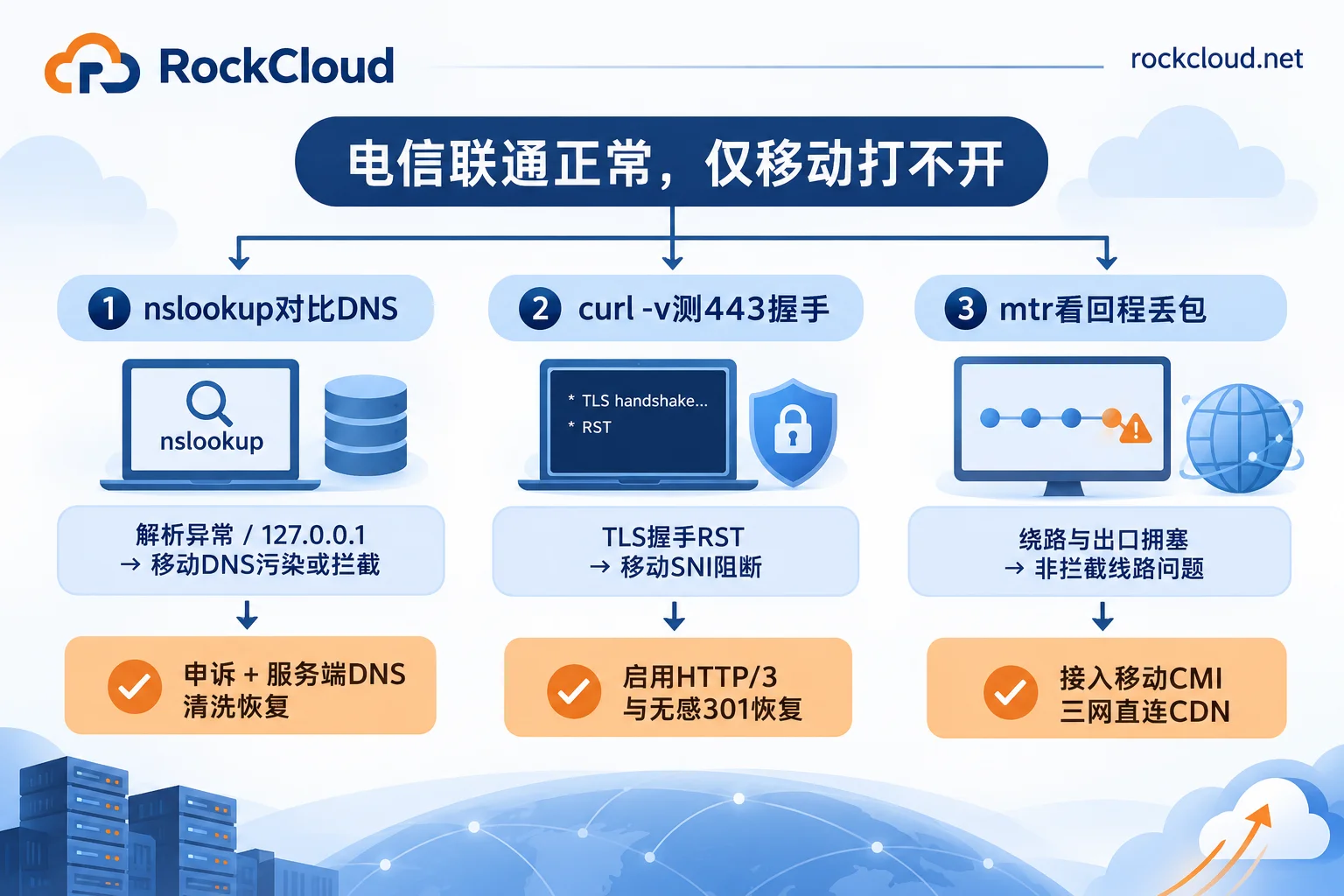
Telecom and Unicom networks can access normally, but only China Mobile broadband or mobile data cannot open the site—it's not necessarily a nationwide block; it could be a "fake block". This phenomenon usually corresponds to three types of causes: first, Mobile regional DNS pollution or domain policy blocking (some provincial Mobile Local DNS returns wrong IPs or blocking prompts); second, SNI blocking during HTTPS handshake (connection is reset as soon as it's established); third, not blocking but Mobile cross-network interconnection/international egress congestion or origin not connected to Mobile CMI direct connection causing packet loss and timeout.
The key to solving this problem is to first spend 5 minutes distinguishing "real blocking" from "line packet loss", then decide whether to go through official appeals, optimize three-carrier direct connections, or directly implement a domain blocking recovery solution on the server side, avoiding blindly changing domains or asking users to manually change DNS.
I. Distinguish Root Cause in 5 Minutes: "Mobile Blocking" or "Mobile Line Packet Loss"?
Before taking any recovery action, perform 4 checks from outside to inside to avoid mistaking line congestion for domain blocking or SNI blocking for server failure:
1. Multi-province, multi-carrier probing
Don't conclude based on just one phone. Use multi-location probing tools to simultaneously test Telecom, Unicom, and Mobile nodes in different provinces nationwide:
- If only Mobile networks in certain provinces cannot open, while Mobile in other provinces and Telecom/Unicom are normal, it's likely regional policy blocking or local Local DNS resolution anomalies.
- If Mobile nodes nationwide generally time out and packet loss occurs, while Telecom/Unicom latency is very low, it's more likely Mobile international egress congestion or the origin data center lacking Mobile direct connection lines.
2. Compare Mobile default DNS with public DNS (troubleshoot DNS pollution and missing records)
Run resolution comparison commands in a Mobile network environment:
nslookup yourdomain.com
nslookup yourdomain.com 223.5.5.5- If Mobile default DNS returns
127.0.0.1,0.0.0.0, private addresses, or anti-fraud/risk warning page IPs, while public DNS like223.5.5.5returns normal CDN or server IPs, it can be basically confirmed as Mobile Local DNS pollution or domain blocking. - If using intelligent line-based resolution and the Mobile line returns empty results or times out, check whether the DNS provider has omitted resolution rules for Mobile or newly expanded Mobile number segments.
3. Test port 443 and TLS handshake (troubleshoot SNI blocking)
In a Mobile network environment, use TCPing to test port 443, and use curl -I -v https://yourdomain.com to view the handshake process:
- Connection reset (
Connection reset by peer): TCP handshake just succeeds, and after the client sends a TLSClientHello(SNI) containing the target domain, an RST packet is immediately received to disconnect—this is typical SNI blocking. This type of blocking directly targets the domain itself, and simply changing the origin IP is often ineffective. - Stuck at
Tryingthen timeout (Connection timed out) with high TCPing packet loss: usually indicates the problem is link transmission packet loss, not clear application-layer blocking.
4. Use MTR to trace return route
On the origin server, execute route tracing to the egress IP of the Mobile test user:
mtr -n -rwc 100 <移动测试IP>If the return route goes through Europe/US or other overseas carriers before entering the Mobile backbone, or high packet loss occurs at Mobile international egress nodes, it proves Mobile return route detour or egress bandwidth congestion, not domain blocking.
II. Must-Do Before Appeal and Recovery: Check for "Hidden Links and Malware" and Origin Collateral Risks
Many site owners wonder: "My site's business is fully compliant, why is it suddenly blocked by Mobile network in a certain province?" The two most common triggers in practice are site hacked and tampered and IP collateral damage:
- Vulnerabilities leading to hidden links or malicious redirects: If the website has SQL injection, file upload, or unpatched CMS vulnerabilities, attackers implant covert third-party redirect scripts or prohibited keywords (site owners often see nothing wrong when opening the homepage, but crawlers or specific UA access triggers redirects), thus being listed in blocking lists by security monitoring systems or local anti-fraud linkage mechanisms.
- Same IP involvement or history: Sharing the same host IP with违规 sites, or being on a shared IP segment that was previously flagged, easily triggers risk control.
Pre-recovery actions: First thoroughly scan webpage source code, third-party JS/Iframe references, and server scheduled tasks to completely clean suspicious scripts and backdoors; if the original server IP was mixed with other sites, it's recommended to migrate to a dedicated clean IP and lock down the origin—only allow trusted back-to-origin node IPs to access, preventing the origin from continued exposure or bypass attacks (for specific lockdown methods, see Why High-Defense CDN Still Gets Breached? Deconstructing Origin IP Leak Paths and Anti-Bypass Back-to-Origin Architecture).
To prevent being hacked again by automated scanners after cleanup and unblocking, it's recommended to enable a Web Application Firewall at the edge layer. For example, RockCloud's Intelligent WEB Firewall (WAF) can be enabled with one click in the control panel, defends against SQL injection, XSS, file inclusion, command injection, and malicious scripts based on OWASP core rule sets, and combines machine learning to identify anomalous scans and malicious requests not included in the rule base, with security technical team assistance in configuring exceptions to avoid false positives on legitimate business or secondary implantation of违规 content by hackers.
III. Targeted Recovery: Implementation Plans for Three Scenarios
After confirming the root cause and cleaning internal risks, choose the most time-saving recovery path with minimal business interruption according to different situations:
Scenario A: Confirmed Mobile Local DNS Pollution or Regional Domain Blocking
1. Official appeal and complaint paths for compliant websites
- Contact Mobile customer service for troubleshooting: Dial
10086, clearly report that the domain resolves abnormally on Mobile network, provide the affected domain and the abnormal Mobile Local DNS IP addresses found during troubleshooting, and request transfer to the network maintenance department for verification. - MIIT appeal channel: If no progress after 48 hours, log in to the MIIT Telecommunications User Appeal Acceptance Center (
https://yhssglxt.miit.gov.cn/web/), select the corresponding Mobile operator as the appeal target, and submit domain registration proof, ICP filing screenshots, and resolution anomaly comparison screenshots. - When clearly redirected to anti-fraud warning page: First ensure the domain has completed ICP filing and thoroughly remove违规 or hacked content from the site, then submit materials according to the contact phone or official appeal channel provided on the blocking page, and wait for verification and data synchronization across regions (usually takes several working days to 1-2 weeks).
2. When you can't wait for the appeal cycle: Server-side solution for in-place recovery
In internet operations, tutorials often suggest "ask users to change their phone or router DNS to 114.114.114.114 or 223.5.5.5", but for websites, apps, or H5 campaign pages targeting ordinary users, requiring visitors to manually change DNS is almost unrealistic (for related limitations, see How to Clean DNS Pollution: Say Goodbye to the Self-Rescue Misconception of Asking Users to Change DNS).
If the business cannot wait for a one-to-two-week operator verification, and you don't want to change the old domain printed on promotional materials or with accumulated SEO weight, you can implement a cleaning and scheduling solution on the server side. RockCloud's blocking pollution recovery capability supports DNS pollution cleaning, and provides in-place recovery without changing the domain and seamless 301 redirects for domain blocking on platforms like WeChat, QQ, and regional operators, minimizing disturbance to end users while restoring accessibility.
Scenario B: Confirmed Mobile SNI Blocking (TLS Handshake Reset)
SNI blocking targets domain features in the TLS handshake plaintext, and simply changing the backend server IP usually cannot bypass it:
- Protocol upgrade (HTTP/3 and TLS 1.3): Check and upgrade certificate configuration to ensure the entire site enables compliant and valid HTTPS and TLS 1.3, and try to enable UDP-based HTTP/3 (QUIC). In many scenarios where blocking only targets traditional TCP 443 plaintext SNI, HTTP/3 handshake mode has significantly better compatibility. RockCloud's Global CDN Acceleration supports HTTP/3 and TLS 1.3 0-RTT by default, can be quickly integrated via CNAME without changing the original DNS provider, and allows parallel switching between old and new links.
- Combine with seamless redirect fallback: If the domain is continuously blocked by key rules so that even HTTP/3 cannot reach directly, use seamless 301 redirects or server-side recovery strategies to take over old domain traffic, avoiding user loss due to direct errors after clicking.
Scenario C: Not Blocking but Mobile Egress Congestion or Lack of Mobile Direct Connection
Many overseas cloud hosts or single-line data centers only optimize Telecom routes, causing severe packet loss for Mobile users during peak hours and pages that keep spinning and timing out. This situation does not require changing servers or migrating data; simply add an edge acceleration network supporting three-carrier direct connection in front of the original server:
- Three-carrier direct connection optimization: RockCloud's CN2 China Acceleration simultaneously covers Telecom CN2 GIA, Unicom AS9929, and Mobile CMI three-carrier direct return to China, accessing via Hong Kong, Japan, South Korea, Singapore and other China-surrounding nodes, ICP filing exempt to solve Mobile cross-network detour issues (for key points on return route selection of filing-exempt CDN, also see Why Filing-Exempt CDN Domestic Access Is Easily Slow).
- Deployment method: The customer's existing server continues as the origin; simply add a CNAME record at the original DNS resolver to integrate, no need to modify NS; if the origin is exposed or accompanied by malicious traffic flooding, you can simultaneously use High-Defense CDN to achieve Anycast cleaning, origin IP hiding, and integrated acceleration and protection, avoiding attack traffic stacking with Mobile egress congestion to make things worse.
IV. Long-Term Anti-Recurrence Recommendations After Recovery
Domain recovery does not mean you can rest easy; it's recommended to include the following three things in your daily operations checklist:
- Three-carrier probing alerts: In addition to monitoring server存活, be sure to add resolution and 443 handshake probes for Telecom, Unicom, and Mobile by province. Once resolution anomalies or increased RSTs occur in a certain province's Mobile network, intervene and troubleshoot immediately before mass user complaints.
- Collaborative troubleshooting at platform and operator levels: If the domain is also used for promotion on social ecosystems like WeChat and QQ, combine with How to Do Domain Blocking Recovery to sort out full-link monitoring, achieving separate alerts and separate fallbacks for different channels.
- Test with real Mobile devices during trial period: If preparing to integrate protection or acceleration nodes, it's recommended to apply for a test environment before switching all traffic (e.g., RockCloud supports contacting customer service to confirm business specifications and then apply for free testing, with fixed peak billing, unlimited traffic and requests). Use Mobile 4G/5G and Mobile broadband in affected provinces to actually verify latency, handshake success rate, and back-to-origin stability, and officially switch after confirming standards are met.