 RockCloud-基石云安全-官方博客
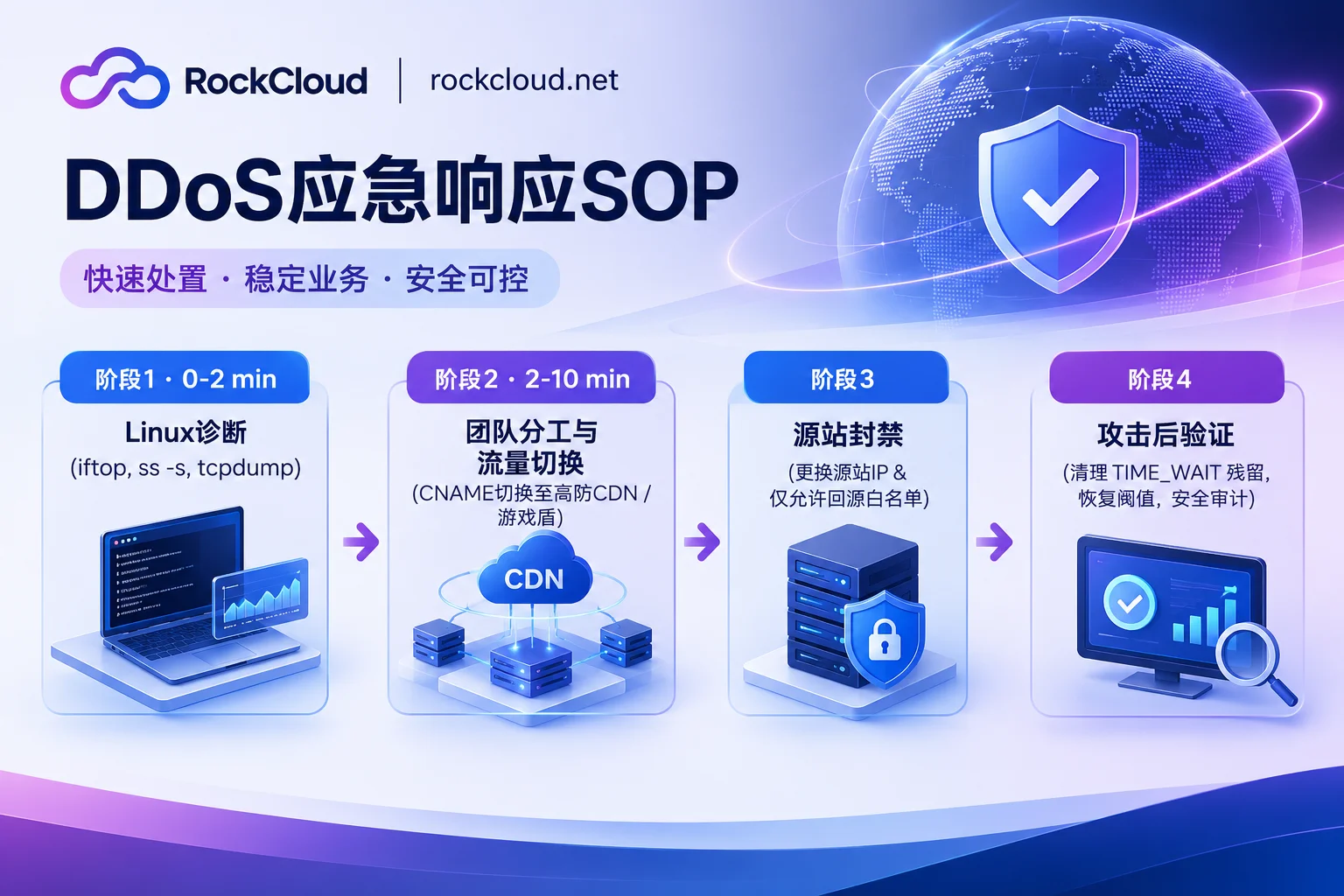
To execute an effective DDoS emergency response, the core is not 'waiting for customer service to reply' or 'restarting the server,' but strictly following a closed-loop SOP: '2-minute command-line triage → 5-minute role-based traffic diversion to stop the bleeding → 15-minute business verification → post-attack connection residual and policy rollback troubleshooting.' According to Cloudflare's Q3 2026 DDoS threat report, 96% of network-layer attacks end within 10 minutes, and 98% of peaks are below 1 Gbps, yet they are enough to bring down an unprotected single origin server; meanwhile, UDP floods (up 122% year-over-year) and DNS reflection amplification (up 215% year-over-year) are also rising rapidly. Facing such 'short, fast, and fierce' assaults, every minute of hesitation on-site means another minute of business downtime.
Whether you are currently staring at a monitoring alert flashing red or writing an actionable emergency plan for your team, the checklist below—from frontline terminal commands to division of labor and recovery—can be executed directly.
1. 2-Minute On-Site Triage: Run These 5 Commands First When You Enter the Server (Do Not Rush to Restart)
After receiving an alert, the two most taboo actions are: first, directly restarting the server (it not only fails to clear external floods but also loses in-memory attack samples; if the host has been implanted with malicious auto-start scripts, it will recur after reboot); second, blindly using iptables to block all overseas IPs (bandwidth-type floods have already saturated the uplink port before reaching the NIC, so local ACLs cannot drop packets in time and may mistakenly block normal overseas users and third-party callbacks).
After logging into the affected host via SSH, it is recommended to first execute screen -S ddos or tmux to establish a persistent session to avoid interruption of troubleshooting commands due to network jitter, and then confirm the nature of the fault within 2 minutes in the following order:
1. Check Whether the NIC Inbound Bandwidth Is Saturated
iftop -i eth0 -nP
# 或者使用 nload eth0 查看实时进出带宽峰值
If inbound traffic instantly hits the server's bandwidth limit, and the source IPs are extremely dispersed with chaotic ports, it is most likely a network-layer or transport-layer flood attack.
2. Check Connection State Distribution (Use ss Instead of the High-Overhead netstat)
When the number of connections surges, netstat reading /proc can easily freeze the terminal; for frontline emergency response, prioritize the lighter ss:
ss -s
ss -ant | awk '{print $1}' | sort | uniq -c | sort -nr
Based on the returned states, you can quickly distinguish the attack layer:
SYN_RECVsoaring to tens of thousands: typical SYN Flood; the attacker only sends handshake requests without ACKs, filling the half-open connection queue. Common symptom: 'server load spikes to dozens, but no high-CPU process is visible intop'—because computing power is entirely consumed by kernel network soft interrupts (softirq).ESTABLISHEDsurging and concentrated on web ports, accompanied by full CPU load of PHP/Java/Nginx processes: mostly application-layer CC attacks (HTTP Flood); bandwidth may not be large, but high-frequency dynamic requests are exhausting database and worker processes.- Connection count and inbound traffic are normal, but the database reports errors and disk I/O
%utilapproaches 100%: this is a business program deadlock or slow query fault; do not blindly switch routes assuming DDoS.
3. Count High-Frequency Source IPs and Capture Packets for Evidence
# 统计当前连接数排名前 20 的来源 IP
ss -ntu | awk '{print $5}' | cut -d: -f1 | sort | uniq -c | sort -nr | head -n 20

# 快速抓取 1000 个数据包保存为样本,供后续溯源或提交给安全团队
tcpdump -i eth0 -nn -c 1000 -w /tmp/ddos_sample.pcap
If bandwidth is already completely saturated and you cannot even type commands in the SSH terminal, immediately switch to the cloud console/monitoring panel to confirm whether blackholing has been triggered, and follow "DDoS Attack Log Analysis and Traceability Troubleshooting Methods: Layered Forensics and Handling When Bandwidth Is Saturated" to perform layered forensics from the uplink port or console logs.
2. A Copyable 'DDoS Emergency Response Plan': Role Division and 0–15 Minute Action Table
Many teams' emergency plans only say 'contact the service provider when an attack occurs.' When something goes wrong at 2 a.m., a dozen people in the group chat simultaneously ask 'Who has the domain management password?' 'Who can change the origin security group?'—all time is wasted on internal communication. The plan must break down actions to specific roles and time windows:
| Response Phase | Target Duration | Responsible Role | Core Execution Actions |
|---|---|---|---|
| Alert Triage | 0–2 minutes | On-duty monitoring / Ops | Verify monitoring curves (bandwidth, packet rate, 5xx ratio), execute ss -s and iftop for triage, distinguish DDoS, CC, or business fault. |
| Unified Command | 2–3 minutes | Emergency Commander (Tech Lead) | Clarify incident severity in the emergency group, designate a single decision-maker, and synchronously engage business stakeholders to decide whether to pause non-core resource-intensive interfaces (e.g., global search, report export). |
| Traffic Diversion and Closure | 3–10 minutes | Network & Security Access | Switch domain resolution to the high-defense scrubbing path; if the attack is ongoing during switchover, simultaneously change the origin IP and tighten firewall rules; prohibit direct origin exposure. |
| Degradation to Maintain Availability | 5–15 minutes | Ops / Backend Development | Enable strong caching for static resources; configure rate limiting or human verification for high-consumption interfaces such as login/SMS/payment; keep core paths available. |
| Communication and Evidence Retention | Synchronized throughout | Customer Service / Operations / Compliance | If brief interruptions occur, publish maintenance or network fluctuation notices in advance; archive attack timestamps, pcap samples, and monitoring screenshots; report to cybersecurity authorities if necessary. |
Special Case: What to Do If You Receive a DDoS Extortion Letter (RDDoS)?
Many teams receive extortion emails demanding cryptocurrency before or after an attack; sometimes attackers first launch a 5–10 minute 'demonstration attack' to apply pressure. During emergency response, hold two bottom lines:
- Never pay the ransom: Industry and security agencies generally recommend not yielding to extortionists; payment not only fails to guarantee the attack stops but also marks you as a 'highly cooperative target,' leading to subsequent rounds of extortion.
- Treat it as a real attack and harden immediately: Retain the complete extortion email original and headers, attack logs, and traffic samples for police evidence; simultaneously activate high-defense traffic diversion and origin hiding so that subsequent attacks hit the scrubbing nodes directly.
3. Traffic Diversion to Stop the Bleeding and Origin Closure: How to Switch Without Making Things Worse?
When attack traffic exceeds the default capacity of the cloud host or data center, the data center often automatically triggers blackholing to protect the switch of the entire rack (typically lasting from 30 minutes to 24 hours; it usually cannot be manually lifted while the attack continues; for specific handling priorities before and after blackholing, refer to "How to Do DDoS Emergency Response? Handling Order Before and After Blackholing").
At this point, rapidly diverting traffic from the vulnerable naked origin to a professional scrubbing system is the only way to restore business accessibility. When building a standing or rapidly switchable DDoS emergency response defense line, different business protocols require corresponding access actions:
1. HTTP/HTTPS Websites and API Businesses: Access High-Defense CDN + WAF
If the business uses Web protocols, when accessing RockCloud High-Defense CDN (https://rockcloud.net/security/), Anycast distributed scrubbing nodes can disperse and block traffic nearby, and DDoS defense and CC defense are on the same request path, so no separate purchase is needed.
- Smooth migration without changing NS: Simply add a CNAME record at your original DNS provider to access; no need to change NS (name servers), and old and new links can transition in parallel during the switch.
- Add intelligent protection to block mixed CC: For sudden application-layer malicious requests or 0day probes, you can enable RockCloud Intelligent WEB Firewall (WAF) (https://rockcloud.net/security/waf/) with one click in the control panel, using OWASP core rule sets combined with machine learning models to identify anomalous traffic not covered by conventional rule libraries; if custom rules are needed during the emergency or business requests are mistakenly blocked, the security technical team can assist in configuring rules and exceptions.
2. The 'Life-Saving Iron Rule' for Emergency Access During an Ongoing Attack: Change IP + Origin Whitelist
If you are urgently mounting a high-defense CDN while already under attack, simply changing a CNAME is often not enough—attackers may already hold your real origin IP and bypass the CDN to continue direct bombardment. At this point, strictly execute two closure steps:
- Simultaneously change the origin server IP (and check potential leak points such as email sending, historical DNS resolution, and subdomains; for specific closure steps, refer to "Emergency Handling and Remediation Steps After Origin IP Leakage: 5-Step Bleeding Control Order").
- The origin security group/firewall only allows RockCloud back-to-origin node IPs, dropping all other public sources to completely cut off bypass paths.
3. Games and Non-HTTP Long-Connection Businesses: Do Not Force-Fit a Web CDN
For businesses such as client games, card games, and real-time communications that rely on non-HTTP TCP/UDP full-protocol forwarding, ordinary web CDNs cannot proxy. Use RockCloud Game Shield (https://rockcloud.net/security/gameshield/), which encapsulates traffic via a private protocol, forwards it through distributed edge nodes, and hides the origin; even if an edge node becomes a target, the system can automatically switch to other high-defense nodes to maintain player long connections.
Under attack and need immediate access? Contact RockCloud's "Security Response" channel or communicate specifications and emergency switchover via Telegram (https://t.me/rockclouds).
4. Why Is the Server Still Lagging After the Attack Stops and Blackholing Is Lifted? 4-Step Post-Attack Recovery Acceptance
Many ops personnel have fallen into the same trap: the security center shows the attack has ended and blackholing is lifted, but users still report pages won't open and APIs intermittently time out. This is usually not because the attack is continuing, but because the system's 'internal injuries' left by the attack have not been cleaned up.
1. Troubleshoot Connection Table Bloat and Temporary Port Exhaustion
After the flood is scrubbed, the origin kernel often still has tens of thousands of unreleased TIME_WAIT or zombie connections, continuously occupying file descriptors and local ephemeral ports, causing new requests to 'fail to allocate ports.' Run ss -s again to check:
- If
TIME_WAITremains high (e.g., over tens of thousands), check whether kernel parametersnet.ipv4.tcp_fin_timeout,net.ipv4.tcp_tw_reuse, and the long-connection pool limits at the gateway/application layer are reasonable. - Check
ulimit -n(file descriptor limit) and whether Nginx/database max connection configurations are still stuck after recovery.
2. Roll Back 'Overly Strict Policies' During Emergency Response
During emergency bleeding control, ops often temporarily lower rate-limiting thresholds very low, or enable strict human verification and block specific regions. If they forget to roll back to 'normal business mode' after the attack, real user peaks and third-party callbacks will be mistakenly blocked by their own rules. When reviewing WAF and rate-limiting rules, it is recommended to confirm whether core callbacks are blocked (e.g., for payment or webhook whitelisting methods, refer to "How to Whitelist Payment Callbacks Blocked by WAF: First Check Rule ID, Then Precisely Allow by Path and IP").
3. Check Whether DDoS Was Just a 'Smoke Screen for Intrusion'
DDoS itself does not steal data, but some attackers use high-volume floods as a smoke screen to cover simultaneous vulnerability exploitation or brute-force attacks. After business stabilizes, be sure to check:
lastandwhologin records to see if any unknown IP successfully logged into the server;crontab -l,/etc/rc.local, and the system service list to confirm no persistent trojans or zombie scripts sending outbound packets have been implanted;- Recent modification times of the web root directory and core configuration files.
4. Turn the Plan into Muscle Memory: Monitoring Baselines + Regular Drills
A paper plan that has not been drilled often fails when real incidents occur due to 'expired accounts' or 'unable to find the origin whitelist.' Recommendations:
- Establish metric baselines and real-time push notifications: Connect bandwidth spikes, abnormal status codes, and connection count alerts to automated notification channels, e.g., via RockCloud control panel network logs, traffic reports, and Telegram real-time data push, so on-duty personnel perceive anomalies on their phones immediately.
- Conduct a tabletop exercise or controlled simulation drill quarterly: Walk through the complete process of 'alert discovery → command-line triage → group division of labor → switch CNAME / enable backup origin,' turning the 2-minute triage and 5-minute bleeding control into the team's conditioned reflex.